
Any international SEO strategy should rely on hreflang as it helps target an international audience with more accuracy.
However, hreflang can be a tricky subject for some SEOs as it can be difficult to use the annotations and to get them implemented correctly on geo-targeted websites. Let’s take a closer look at what you need to know to implement hreflang, optimize it and the mistakes you should avoid.
What is hreflang and how does it work?
Before we can understand how it works, let’s make sure we’re all on the same page regarding what hreflang actually is. Simply put, hreflang is an HTML attribute that helps Google decide which page should be shown, and who to show it to.
Hreflang annotations aim to cross-reference pages that are similar in content, but target different audiences according to their language and/or country. It ensures that the correct content and pages will be shown to the right users when they enter a query in the version of Google search that you are targeting.
The example below shows the hreflang tags that target French speakers in France and French speakers in Canada:
<link rel=”alternate” hreflang=”fr-fr” href=”http://www.example.com/fr/” />
<link rel=”alternate” hreflang=”fr-ca” href=”http://www.example.com/fr-ca/” />
Both of these tags would appear on both pages. This would ensure that Canadians searching on google.ca would find the page targeting Canadians, and French people searching on google.fr would find the page targeting the French.
Why hreflang matters in SEO
Hreflang tags help send a strong signal to Google that one page is a translation or localization of another, which in turn helps boost the ranking of new translations.
Hreflang tags are a key element to an internationalized website and thus your international SEO. It can also be useful in regards to sharing the quality, relevance, and authority signals across multiple language versions of your site.

How to construct a hreflang tag: 3 methods
Now we know what it is, let’s look at how to set it up. Setting up your hreflang requires the language and country code and it needs to reference all pages that serve as alternates. You can take a look at our e-book that walks you through the entire process.
There are three ways to implement your hreflang tags that we will detail below.
During a crawl with the Oncrawl app, we can collect and analyze the hreflang declarations that tell search engines which language the page is written in, and which other languages are available.
1. HTML hreflang declarations in the page <head>
Similarly to canonical tags, hreflang tags take the following form:
<link rel="alternate" hreflang="en" href="https://www.yoursite.com/your_translated_page" />
2. Hreflang declarations in the page’s HTTP headers
This method is particularly useful if your page is a file in a format other than HTML, such as an image or a PDF.
These declarations look like this:
Link: <https://www.yoursite.com/your_original_page>; rel="alternate"; hreflang="en", <https://www.yoursite.com/your_translated_page>
3. Hreflang declarations in sitemaps
By declaring hreflang references in sitemaps, you are able to keep all of your references in a single place. However, this also means you need to keep your sitemaps updated when you add translations or localizations.
Sitemaps declarations add an <xhtml:link> tag and its properties to the listing for each page with hreflang translations:
<url>

<loc>https://www.yoursite.com/your_original_page</loc>

<xhtml:link

rel="alternate"

hreflang="en"

href="https://www.yoursite.com/your_translated_page"/>

</url>
If you use this method for your hreflang declarations, you may want check the following option in your crawl settings:
Expand the Sitemaps section of the crawl settings.
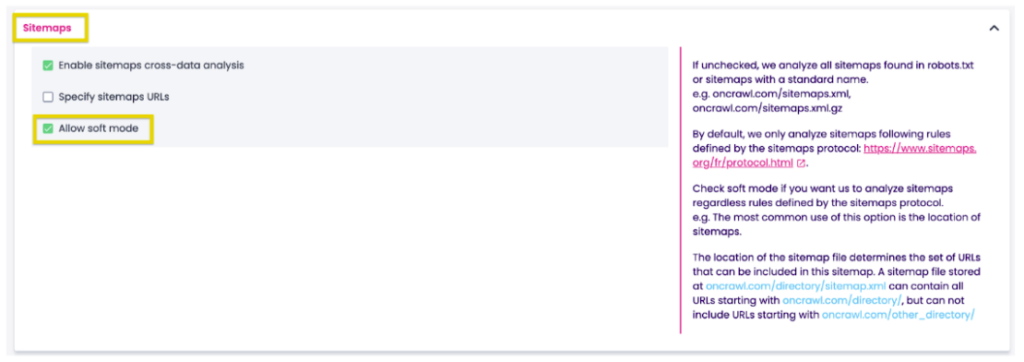
You may also want to tick the Allow soft mode box. This ensures that we’ll analyze sitemaps regardless of whether you follow the rules of the sitemap’s protocol. Many sites ignore these rules with regard to where they place sitemaps. This way, you do not need to specify sitemap URLs.
Optimizing hreflang use
Hreflang tags, regardless of the method you choose to implement them, have consistent and important elements to respect. Otherwise, you risk them being ignored by search engines and worse, your intended audience won’t be able to find them.
Setting up your crawl for hreflang analysis
Hreflang data is automatically included in every crawl, so you don’t have to do anything special.
If your site is translated or localized and you want to analyze complete hreflang data, the only thing you need to do is to make sure that all pages of the site are crawled, no matter what language they’re in.
Let’s say your site has translations in different directories, such as https://www.yoursite.com/es and https://www.yoursite.com/en:
- If there are links from your start URL to each directory, you don’t need to do anything else.
- If you’re not sure, it doesn’t hurt to list all of the directories as start URLs. You can do this in the Start URL section of the crawl settings.
If, however, your site has translations in different subdomains, such as https://es.yoursite.com and https://en.yoursite.com, then you’ll need to consider the following things:
- If there are links from your start URL to each subdomain, scroll down to the Subdomains section in the crawl settings and tick the box for Crawl encountered subdomains. That’s it!
- In case you’re not sure, you can list all language or regional subdirectories as start URLs. You can do this in the Start URL section of the crawl settings. If you list all your translation URLs as start URLs, you do not need to enable the crawl encountered subdomains option unless you want to explore additional subdomains during the crawl.
Finally, let’s look at the scenario where your site has translations on different domains, such as https://www.mysite.es and https://www.mysite.co.uk
- In the Start URL section of the crawl settings, you must list all domains as start URLs. This is the only way to get your site’s hreflang data for both domains at once.
Available hreflang data
As with all of our data, you can click through to the Data Explorer to view the hreflang URLs, languages, specific issues, and page clusters for each URL.
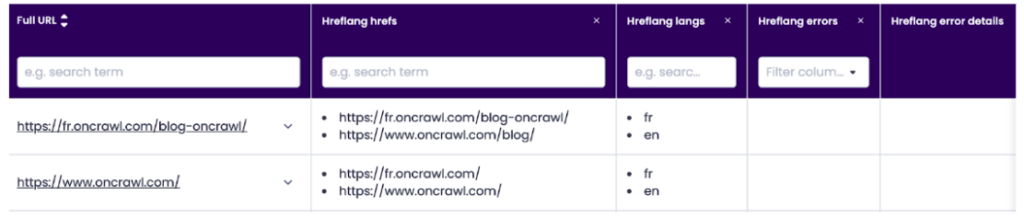
Additional hreflang columns can also be added to any Data Explorer results including:
- Hreflang hrefs: a list of all the URLs referenced in hreflang links on the page.
- Hreflang langs: a list (in the same order as the hreflang hrefs) of all the languages referenced in hreflang links on the page.
- Hreflang errors: a list of all of the implementation errors (if any) found for the page.
- Hreflang error details: a link to an overview of hreflang use for the page, including a link to the Oncrawl Query Language filter for the page cluster, and error details for each error encountered.
- Hreflang cluster ID: an Oncrawl ID that uniquely identifies each cluster of pages that reference each other as hreflang translations.
- Hreflang source: a list (in the same order as the hreflang hrefs) of the location where Oncrawl found the hreflang reference. The source of an hreflang declaration in this list can be HTML, header or the URL of a sitemap.
Hreflang page clusters
On any page, hreflang declarations list all of the equivalent pages for other languages or regions. Together, these pages form a cluster.
When hreflangs are correctly implemented, each page in a cluster will have an hreflang reference to every other page in the cluster, including a reference to itself. Below is an example of a simplified ideal cluster:
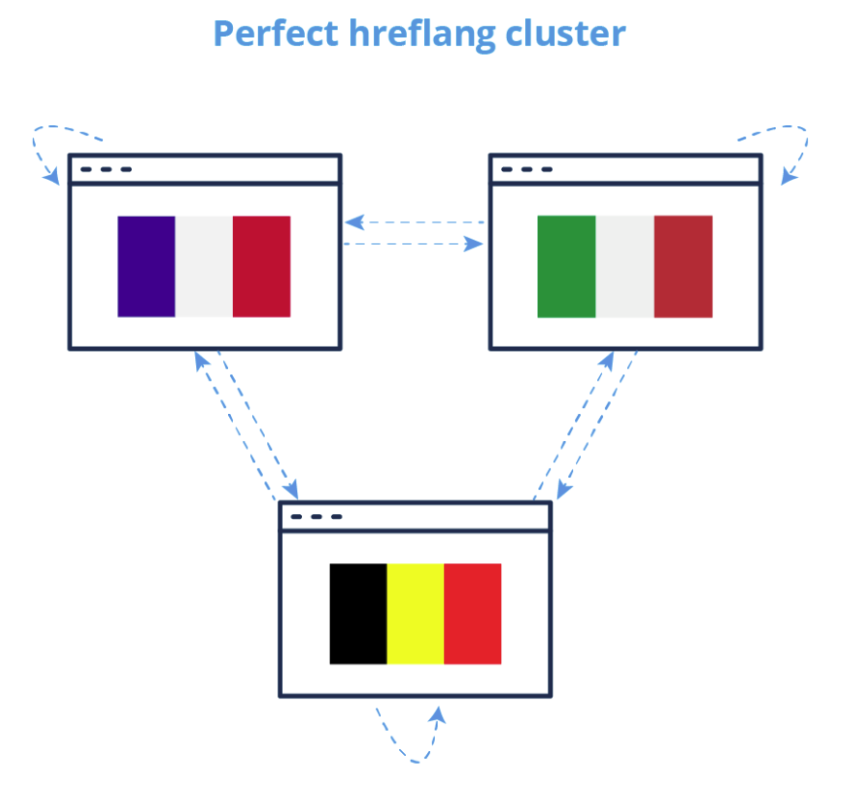
All pages that are referenced as hreflangs should be canonical and indexable pages.
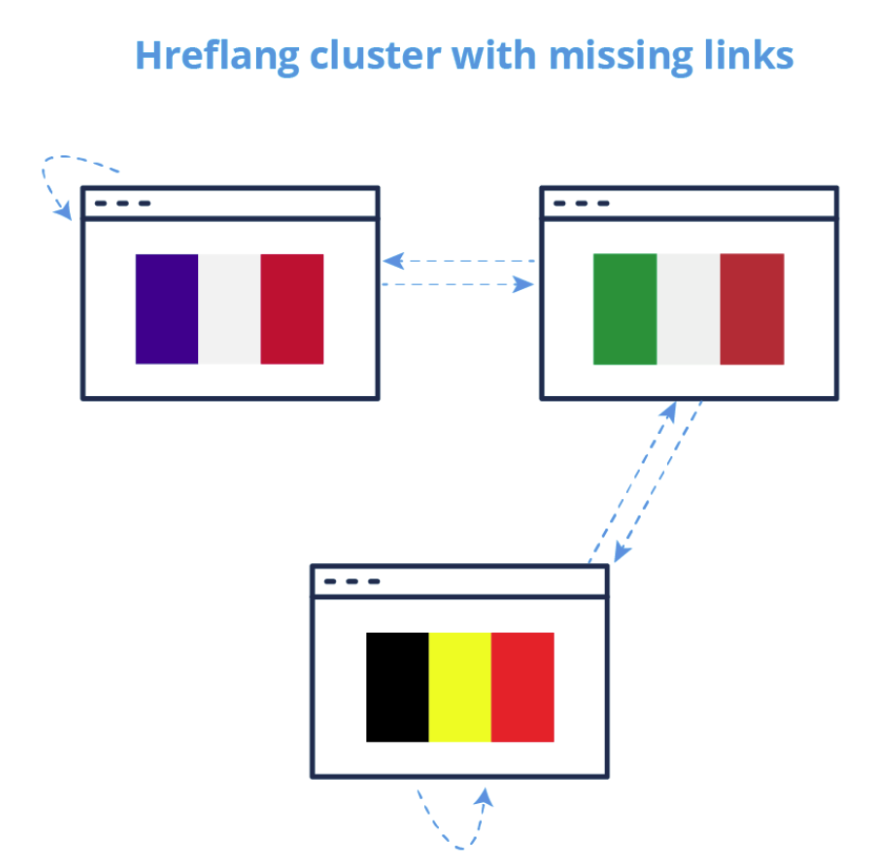
However, it often happens that some of the links within a cluster are missing or incorrect, producing clusters with errors.
How to identify and explore hreflang page clusters in Oncrawl
It’s pretty simple to identify and explore hreflang page clusters using the Oncrawl Data Explorer. Each cluster is assigned a unique ID and to view the pages in the cluster for a specific URL, you can use the following shortcut for the Oncrawl Query language filter:
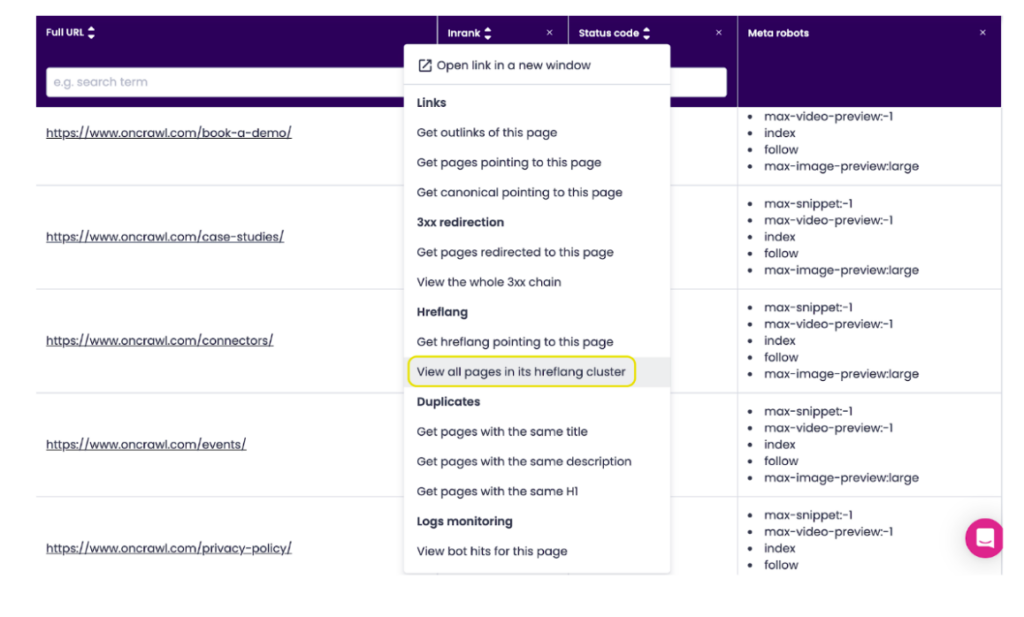
You can easily check whether you’ve added the correct language alternates on all of the necessary pages.
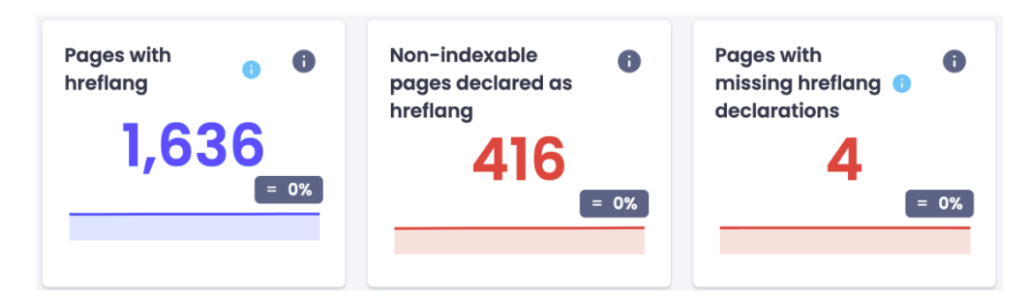
Identifying hreflang issues
There are two main charts in the app that we recommend looking at to identify hreflang issues on your site: the hreflang issues chart and the non-indexable pages declared as hreflang chart.
Both can be found in the default dashboard under Crawl report > Indexability > Rel alternate.
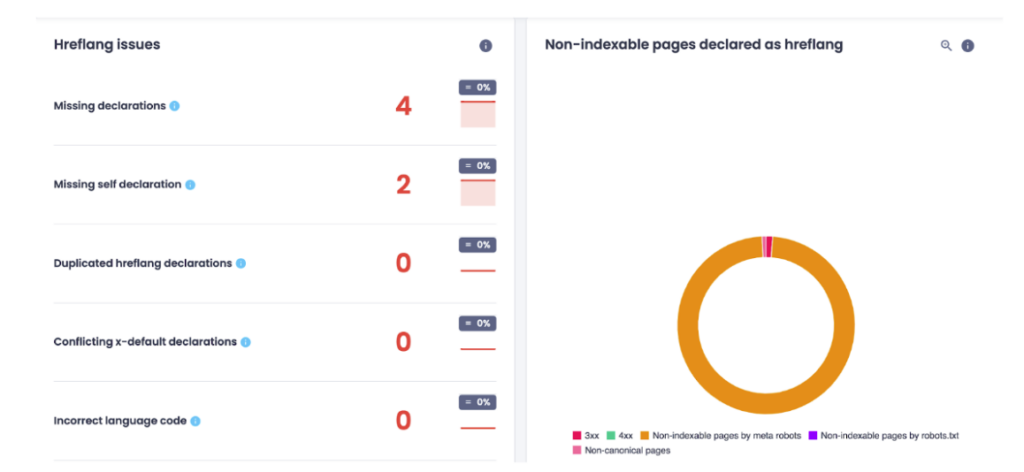
Certain issues may prevent Google from taking your hreflang declarations into account such as:
Missing declarations
- Missing outbound declarations: The page is missing declarations to some pages in the cluster.
- Missing inbound declarations: Some pages in the cluster don’t declare this page.
Missing self declaration
- The page doesn’t declare itself as alternate.
Duplicate hreflang declarations
- Multiple hreflangs for the same language: The page declares multiple hreflangs for the same language.
- Same hreflang for multiple languages: The page declares an hreflang multiple times, and for multiple languages.
- Hreflang set in multiple places: The page declares an hreflang multiple times, and in several places (sitemaps, header, html).
- Page is hreflang for multiple languages: The page is declared as alternate by other pages for multiple languages.
- Duplicate hreflang declaration: The page declares an hreflang multiple times, for the same language.
Conflicting x-default declarations
- The page declares an x-default URL that isn’t the same as the x-default URL declared by at least one other page in the cluster.
Incorrect language code
- The page declares an hreflang with an incorrect language code.
Non-indexable pages declared as hreflang
- Hreflang annotations with a bad status code: The page is part of a cluster containing pages with a 5xx status or that did not respond.
- 3xx hreflang: The page is part of a cluster containing pages with a 3XX status.
- 4xx hreflang: The page is part of a cluster containing pages with a 4XX status.
- Non-indexable hreflang by meta robots: The page is part of a cluster containing non-indexable pages by meta robots
- Non-indexable hreflang by robots.txt: The page is part of a cluster containing non-indexable pages by robots.txt
- Non-canonical hreflang: The page is part of a cluster containing non-canonical pages
- Non-indexable page: The page is not indexable, but is part of an hreflang cluster.
Top tips for implementing hreflang
In order to prevent Google from treating your translations as duplicate content, it is especially important to indicate translations of pages when content may look very similar to a search engine. This may be the case in the following examples:
- User-created page content (e.g. forums, comments, or product reviews).
- Regional variants (e.g. a page in South African English and a page in American English).
- Translations of entire sections or entire sites.
When using hreflang tags, here are some top tips to help you optimize your pages and the mistakes you should avoid.
Make sure that links are reciprocal
A problem with reciprocal links means that hreflang annotations don’t cross-reference each other. You can see these errors within your Google Search Console under the International Targeting tab.
A key rule you need to keep in mind is that your annotations must be confirmed from the other pages. For instance, if page A links to page B, page B needs to link back to page A to avoid misunderstanding from search engines. Page A should use rel-alternate-hreflang annotation linking to itself to work correctly. Non-reciprocal links are ignored by Google.
Use the correct URL format
List the URL in the correct format: “https://www.yoursite.com/your_page“. Don’t skip the “https://”!
The hreflang=”x-default” is an option
Use the optional value hreflang=”x-default” for language selection pages or for pages that automatically redirect to the user’s language.
Create a generic language page
Indicate a generic language page, such as “en”, if you have a series of regional pages in that language (“en-US”, “en-GB”, “en-CA”, “en-ZA”, “en-AU”). This page will be used for all regions you didn’t specify. In this example, that might include English-speaking New Zealand, or even a user browsing in English from France.
Use the correct country or language codes
Using hreflang implies targeting the right country or language, so be sure to add the right codes to your webpages. Google explains that,
“The value of the hreflang attribute must be in ISO 639-1 format for the language, and in ISO 3166-1 Alpha 2 format for the region. Specifying only the region is not supported.”
Some studies show Google recognizes certain errors and corrects for them; others show the opposite. It’s easiest to err on the side of caution and use the correct codes.
If the targeted language uses multiple scripts, you can also choose to specify the script. For example, to indicate a page in the Simplified Chinese script for users in Taiwan, you can use the code: zh-Hans-TW
Until recently, Google required you to list all available translations of a page. This practice is still strongly encouraged. However, even if you can’t list all translations of the page, you must include reciprocal rel=”alternate” links between each translated page and the page in the main or original language of your site.
Avoid adding hreflang tags to no-indexed pages
Google reports hreflang tags as an error if they point to noindex pages, either they are with a meta-robots noindex tag or blocked in robots.txt
Google will not be able to follow the return link from that blocked page back to the originating link, so it will report a return tag error. Please note that only pages that are blocked will stop working, not all your hreflang tags in a page group.
Choose the one method you want to use: don’t mix page tagging methods and hreflang sitemaps methods
Combining methods to implement hreflang is counterproductive. Here are some points to keep in mind when deciding whether to use the xml sitemaps or page tagging methods:
- CMS like WordPress offer automatic hreflang page tagging solutions.
- Hreflang xml sitemaps can be tricky to create. You can use online tools or create it in Excel, but it is difficult to automate the process. If you have xml sitemaps that your CMS updates for you automatically, it would be better to continue to use those rather than create separate, static hreflang xml sitemaps.
- Page tagging creates massive codes, especially when it comes to multiple countries/languages targeting. Ultimately, this can mean an additional 10+ lines of code on each geo-targeted page.
Don’t use hreflang to try to resolve duplicate content issues
Some SEO myths keep saying that implementing hreflang tags will help fix duplicate content problems. Actually, for similar content, adding hreflang tags to your site will help Google recognize and understand the country and language’s target of your page, but it won’t help search engines decide which version of content is the best for a query in the SERPs.
Let’s say you have two pages in the same language targeting different zones such as French in France and French in Belgium. The content of those two pages may be so similar that they are considered duplicates; adding hreflang tags will not help.
It is still possible that your French page may outrank your Belgium page, if the French page has more link authority, and especially if it has links from French-language sources.
Hreflang helps Google to understand your content, but to create an effective international marketing strategy, you need to include link building to your sites from the relevant countries/language you are targeting. This will subsequently help to leverage the value of your international versions.
Duplicate content is a serious, but separate issue, that should be treated separately.
Final thoughts
In conclusion, mastering hreflang implementation is a crucial aspect of any international SEO strategy and Oncrawl’s a great ally for international SEOs as it gives you a precise view of the state of your hreflang implementation.
Constructing hreflang tags may seem complicated, but whether through HTML declarations, HTTP headers, or sitemaps, the goal remains consistent—accurately signaling the relationships between pages targeting different languages and regions.
And although it is an important and powerful tool, hreflang is not the be-all, end-all when it comes to international SEO. A holistic international marketing strategy is imperative for sustained success.
As you navigate the multilingual and multicultural digital landscape, let hreflang be your compass, guiding users seamlessly to the content they seek, regardless of borders or languages.