Loading speed and web performance are on everyone’s lips in the SEO and webperf communities, and more broadly in E-marketing and E-commerce.
As Andy Davies, consultant and reference in web performance, reminds us:
“The context influences the experience, experience influences behavior, behavior influences business revenues.”
So whether you’re trying to increase your revenue, your SEO, or both, you’re bound to know that fast pages are essential to the quality of your user experience. Speed also helps send the right signals to Google, which has been taking speed into account since the Page Experience update.
As you also know, a site must meet the expectations of users before meeting those of search engines. Thus, display speed and interactivity are part of the prerequisites for a quality user experience, primarily to promote engagement and conversions!
Note for example that, according to a Google study, 77% of Internet users are more inclined to order on a site or an application that allows them to finalize their purchase quickly.
But which techniques have the most visible impact on your visitors, in order to offer them a smooth browsing experience and a real sense of speed?
Here is a checklist organized by optimization levers, for better display speed and interactivity.
Optimize the display speed of a site
The lighter a page is, the less time it needs to display.
In addition to resource optimization, you can set the display rate and dimensions of the different elements that make up a page to enhance the feeling of speed and usability. Here are some essential techniques:
- Compressing images to the most efficient formats
The new generation WebP (recommended by Google) and AVIF (which offers even better results) formats allow you to reduce the weight of images by up to 50% compared to JPEG, while maintaining optimal visual quality. Knowing that the weight of images represents about 50% of the weight of the pages, it is an essential lever to make your pages fast.
- Adapt the display of media and images to different screens
Resize and define the size of media and images depending on whether the user visits your site from a mobile or a computer.
- Reduce the weight of page resources
Optimize your code: minification (removal of unnecessary characters) of HTML, JS and CSS files, and resource compression (Gzip and Brotli formats), and in some cases concatenation, are all good practices to reduce the weight of pages, and therefore speed up the display in the browser.
- Lazy loading
This technique consists in loading only what is visible on the screen, instead of loading the entire page. In other words, the browser only provides the effort strictly necessary in relation to what the visitor needs to see on his screen.
- Optimize fonts
You can optimize the format of your fonts (e.g. WOFF2, which saves 30 to 50% on file size), and also choose to display text even if the font is not yet loaded by the browser, to speed up rendering.
- Eliminate blocking resources and load them asynchronously
Avoid blocking the rendering of your pages: prefer loading resources asynchronously, especially for CSS (critical CSS), JS (async and defer) and fonts (display:swap).
Of course, if you have no choice because some resources are essential at the beginning of the page loading, these resources must be as light as possible.
- Adopt the right caching strategy
In order to make pages display as fast as possible for your users, cache static elements.
To do this, you need to identify dynamic content and static content beforehand, and define the rules for caching static content: for how long, and on which cache (browser, origin or CDN).
Improve interactivity: instantly responsive pages
In addition to the speed at which elements are displayed in the browser, the ability to interact is essential to provide total satisfaction to your users.
Otherwise, you expose them to frustration that translates into behaviors such as rage clicks, the mouse moving frantically on the page, or random scrolling to check that the page is working.
In the worst case, your visitors come back to the previous page, or leave your site for good to do a new search on Google, or go to your competitors. Remember that in case of a negative experience, 43% of Internet users will go to a competitor’s site for their next purchase. You must therefore give yourself the means to attract but also to keep your visitors.
Most often, it is the third party scripts and Javascript that can be responsible for a bad interactivity. Indeed, as long as the browser is busy retrieving, parsing and executing JavaScript, it cannot respond to the user’s interactions.
Here again, there are techniques to optimize your code and your third parties, and allow your visitors to enjoy an optimal experience:
- Reduce the impact of third parties by delaying their loading
You can start loading and executing scripts after the priority content elements are displayed on your page. But beware: keep in mind that deferring the loading of JavaScript does not make it free in terms of performance!
It may be a matter of postponing the loading of some functionalities (chat, widgets, tracking…) after the display of the main elements to reassure the user, but it doesn’t cancel the time needed for the browser to process the code, it only shifts it in time.
- Reduce JavaScript execution time
Divide up the tasks that take your browser time (long tasks), and also make sure to favor short processing in response to user interactions (for example, avoid actively listening for certain events such as scrolling; and take advantage of times when the browser has free time to run certain JavaScript processing).
- Reduce the work of the main thread
The browser will be able to respond faster to interactions by reducing the number of requests and the size of the exchanges.
Save time too: automate your site’s optimization techniques
We’ve just covered two very important aspects of the user experience: display speed and interactivity. The good news is that all the optimizations we have just mentioned in this checklist can be automated!
Also, you may have linked to two of Google’s Core Web Vitals that allow you to evaluate these aspects, respectively: the Largest Contentful Paint and the Interaction to Next Paint (INP).
Of course, you should also think about improving the visual stability of your pages for an optimal user experience, by working on your Cumulative Layout Shift score.
You should know that these 3 metrics (LCP, CLS and Total Blocking Time, or TBT, an equivalent of INP) account for 80% of the score attributed by PageSpeed Insights.
So, logically, anything you do to speed up your pages and optimize these metrics will have a positive impact on your users, as well as on your performance scores.
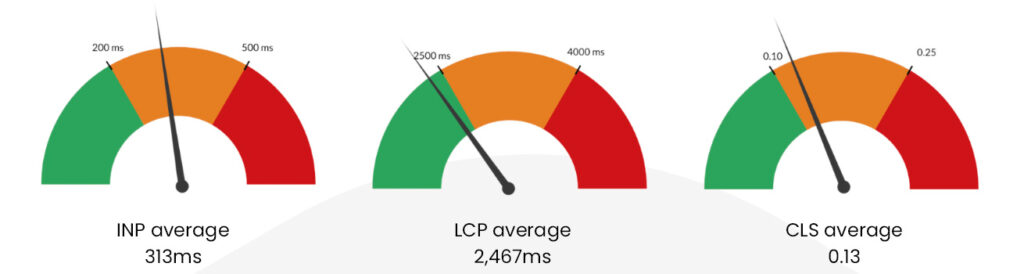
Webperf survey of the top 50 most-visited sites in France – source: Fasterize
In short, you can apply the same approach to your UX as you do in SEO: quality content and experience guarantee user satisfaction, and contribute to being better indexed by Google.
Also, as in SEO, webperf optimizations must be maintained over time. This requires time and expertise because techniques and metrics evolve quickly.
Moreover, even in large teams, technical resources do not always have the time or the knowledge to effectively maintain the speed of a site; and deploying resources and energy for a commando operation that falls like a soufflé is very frustrating and even discouraging.
So, rather than wasting time on maintenance, dreading the side effects at each evolution of the site, and multiplying the plugins at the risk of overloading it, it is better to automate the application of all the frontend optimization techniques with a single tool!
It’s important to note that in most cases, for high traffic e-commerce sites, the ROI of a webperf optimization solution is easy to measure. In fact, Google has estimated that -0.1 seconds of loading time can lead to +8% conversions, which a frontend optimization solution can achieve very easily.
At Fasterize, we have found that often, even an increase in conversion rates of less than 1 point is enough to ensure the ROI of our SaaS solution; not to mention the time saved by the technical teams.
Business being the sinews of war, you can do the calculation by yourself, and it is easy to do! It allows you to understand the interest of automating performance optimization, and to convince and involve your internal teams. Save time on all fronts!