Controlling Crawling & Indexing: An SEO’s Guide to Robots.txt & Tags
Optimising for crawl budget and blocking bots from indexing pages are concepts many SEOs are familiar. But the devil is in the details. Especially as the best practices have significantly altered over recent years.
One small change to a robots.txt file or robots tags can have dramatic impact on your website. To ensure the impact is always positive for your site, today we are going to delve into:
Optimising Crawl Budget
What is a Robots.txt File
What are Meta Robots Tags
What are X-Robots-Tags
Robots Directives & SEO
Best Practice Robots Checklist
Optimising Crawl Budget
A search engine spider has an “allowance” for how many pages it can and wants to crawl on your site. This is known as “crawl budget”.
Find your site’s crawl budget in the Google Search Console (GSC) “Crawl Stats” report. Note that the GSC is an aggregate of 12 bots which are not all dedicated to SEO. It also gathers AdWords or AdSense bots which are SEA bots. Thus, this tool gives you an idea of your global crawl budget but not its exact repartition.
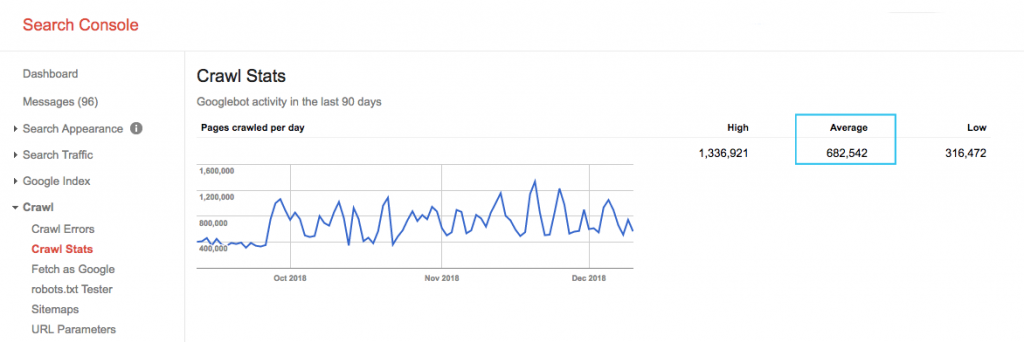
To make the number more actionable, divide the average pages crawled per day by the total crawlable pages on your site – you can ask your developer for the number or run an unlimited site crawler. This will give you an expected crawl ratio for you to begin optimising against.
Want to go deeper? Get a more detailed breakdown of Googlebot’s activity, such as which pages are being visited, as well as stats for other crawlers, by analysing your site’s server log files.
There are many ways to optimise crawl budget, but an easy place to start is to check in the GSC “Coverage” report to understand Google’s current crawling and indexing behaviour.
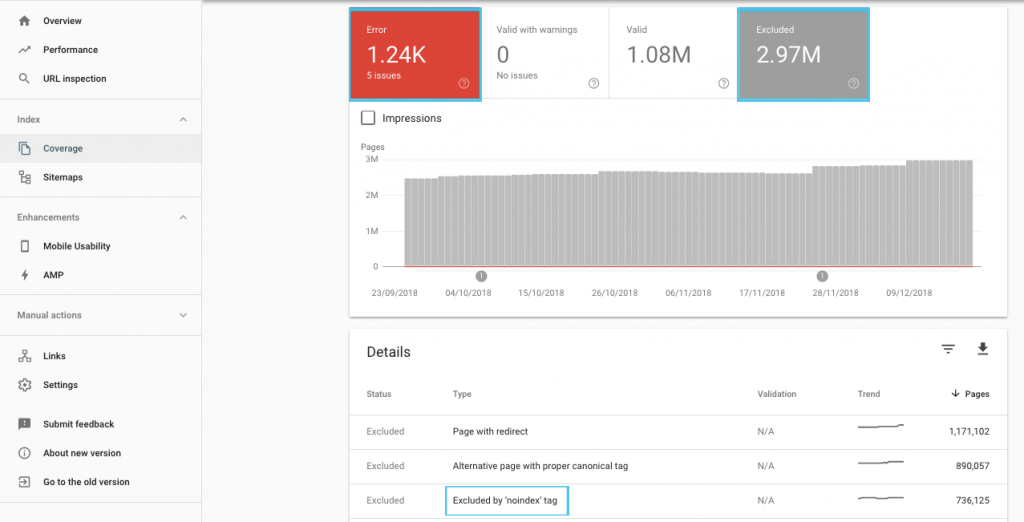
If you see errors such as “Submitted URL marked ‘noindex’” or “Submitted URL blocked by robots.txt”, work with your developer to fix them. For any robots exclusions, investigate them to understand if they’re strategic from an SEO perspective.
In general, SEO’s should aim to minimise crawl restrictions on robots. Improving your website’s architecture to make URLs useful and accessible for search engines is the best strategy.
Google themselves note that “a solid information architecture is likely to be a far more productive use of resources than focusing on crawl prioritization”.
That being said, it’s beneficial to understand what can be done with robots.txt files and robots tags to guide crawling, indexing and the passing of link equity. And more importantly, when and how to best leverage it for modern SEO.
[oc-redirect num=1]
What is a Robots.txt File
Before a search engine spiders any page, it will check the robots.txt. This file tells bots which URL paths they have permission to visit. But these entries are only directives, not mandates.
Robots.txt can not reliably prevent crawling like a firewall or password protection. It’s the digital equivalent of a “please, do not enter” sign on an unlocked door.
Polite crawlers, such as major search engines, will generally obey instructions. Hostile crawlers, like email scrapers, spambots, malware and spiders that scan for site vulnerabilities, often pay no attention.
What’s more, it’s a publically available file. Anyone can see your directives.
Don’t use your robots.txt file to:
- To hide sensitive information. Use password protection.
- To block access to your staging and/or development site. Use server-side authentication.
- To explicitly block hostile crawlers. Use IP blocking or user-agent blocking (aka preclude a specific crawler access with a rule in your .htaccess file or a tool such as CloudFlare).
Every website should have a valid robots.txt file with at least one directive grouping. Without one, all bots are granted full access by default – so every page is treated as crawlable. Even if this is what you intend, it’s better to make this clear for all stakeholders with a robots.txt file. Plus, without one, your server logs will be riddled with failed requests for robots.txt.
Structure of a robots.txt file
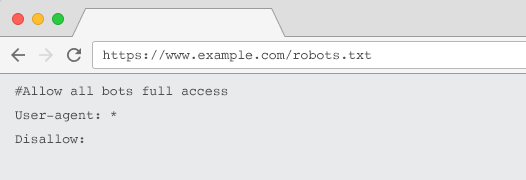
To be acknowledged by crawlers, your robots.txt must:
- Be a text file named “robots.txt”. The file name is case sensitive. “Robots.TXT” or other variations won’t work.
- Be located on the top-level directory of your canonical domain and, if relevant, subdomains. For example, to control crawling on all URLs below https://www.example.com, the robots.txt file must be located at https://www.example.com/robots.txt and for subdomain.example.com at subdomain.example.com/robots.txt.
- Return a HTTP status of 200 OK.
- Use valid robots.txt syntax – Check using the Google Search Console robots.txt testing tool.
A robots.txt file is made up of groupings of directives. Entries mostly consist of:
- 1. User-agent: Addresses the various crawlers. You can have one group for all robots or use groups to name specific search engines.
- 2. Disallow: Specifies files or directories to be excluded from being crawled by the above user agent. You can have one or more of these lines per block.
For a full list of user agent names and more directive examples, checkout the robots.txt guide on Yoast.
In addition to “User-agent” and “Disallow” directives, there are some non-standard directives:
-
- Allow: Specify exceptions to a disallow directive for a parent directory.
- Crawl-delay: Throttle heavy crawlers by telling bots how many seconds to wait before visiting a page. If you’re getting few organic sessions, crawl-delay can save server bandwidth. But I’d invest the effort only if the crawlers are actively causing server load issues. Google doesn’t acknowledge this command, offers the option to limit crawl rate in Google Search Console.
- Clean-param: Avoid re-crawling duplicate content generated by dynamic parameters.
- No-index: Designed to control indexing without using any crawl budget. It’s no longer officially supported by Google. While there is evidence it may still have impact, it’s not dependable and not recommended by experts such as John Mueller.
@maxxeight @google @DeepCrawl I’d really avoid using the noindex there.
— ???? John ???? (@JohnMu) September 1, 2015
- Sitemap: The optimal way to submit your XML sitemap is via Google Search Console and other search engine’s Webmaster Tools. However, adding a sitemap directive at the base of your robots.txt file assists other crawlers who may not offer a submission option.

Limitations of robots.txt for SEO
We already know robots.txt can’t prevent crawling for all bots. Equally, disallowing crawlers from a page doesn’t prevent it being included in search engine results pages (SERPs).
If a blocked page has other strong ranking signals Google may deem it relevant to show in the search results. Despite not having crawled the page.
Because the content of that URL is unknown to Google, the search result looks like this:

To definitively block a page from appearing in SERPs, you need to use a “noindex” robots meta tag or X-Robots-Tag HTTP header.
In this case, don’t disallow the page in robots.txt, because the page must be crawled in order for the “noindex” tag to be seen and obeyed. If the URL is blocked, all robots tags are ineffective.
What’s more, if a page has accrued a lot of inbound links, but Google is blocked from crawling those pages by robots.txt, while the links are known to Google, the link equity is lost.
What are Meta Robots Tags
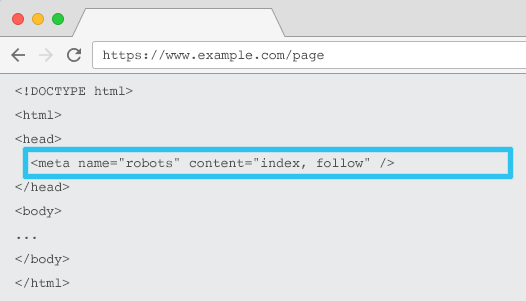
Placed in the HTML of each URL, meta name=”robots” tells crawlers if and how to “index” the content and whether to “follow” (i.e., crawl) all on-page links, passing along link equity.
Using the general meta name=“robots”, the directive applies to all crawlers. You can also specify a specific user agent. For example, meta name=”googlebot”. But it’s rare to need to use multiple meta robots tags to set instructions for specific spiders.
There are two important considerations when using meta robots tags:
- Similar to robots.txt, the meta tags are directives, not mandates, so may be ignored by some bots.
- The robots nofollow directive only applies to links on that page. It’s possible a crawler may follow the link from another page or website without a nofollow. So the bot may still arrive at and index your undesired page.
Here’s the list of all meta robots tag directives:
- index: Tells search engines to show this page in search results. This is the default state if no directive is specified.
- noindex: Tells search engines not to show this page in search results.
- follow: Tells search engines to follow all the links on this page and pass equity, even if the page isn’t indexed. This is the default state if no directive is specified.
- nofollow: Tells search engines not to follow any link on this page or pass equity.
- all: Equivalent to “index, follow”.
- none: Equivalent to “noindex, nofollow”.
- noimageindex: Tells search engines not to index any images on this page.
- noarchive: Tells search engines not to show a cached link to this page in search results.
- nocache: Same as noarchive, but only used by Internet Explorer and Firefox.
- nosnippet: Tells search engines not to show a meta description or video preview for this page in search results.
- notranslate: Tells search engine not to offer translation of this page in search results.
- unavailable_after: Tell search engines to no longer index this page after a specified date.
- noodp: Now deprecated, it once prevented search engines from using the page description from DMOZ in search results.
- noydir: Now deprecated, it once prevented Yahoo from using the page description from the Yahoo directory in search results.
- noyaca: Prevents Yandex from using the page description from the Yandex directory in search results.
As documented by Yoast, not all search engines support all robots meta tags, or are even clear what they do and don’t support.

* Most search engines have no specific documentation for this, but its’ assumed that support for excluding parameters (e.g., nofollow) implies support for the positive equivalent (e.g., follow).
** Whilst the noodp and noydir attributes may still be ‘supported’, the directories no longer exist, and it’s likely that these values do nothing.
Commonly, robots tags will be set to “index, follow”. Some SEOs see adding this tag in the HTML as redundant as it’s the default. The counter argument is that a clear specification of directives may help avoid any human confusion.
Do note: URLs with a “noindex” tag will be crawled less frequently and, if it’s present for a long time, will eventually lead Google to nofollow the page’s links.
It’s rare to find a use case to “nofollow” all links on a page with a meta robots tag. It is more common to see “nofollow” added on individual links using a rel=”nofollow” link attribute. For example, you may want to consider adding a rel=”nofollow” attribute to user generated comments or paid links.
It’s even rarer to have an SEO use case for robots tag directives that do not address basic indexing and follow behaviour, such as caching, image indexing and snippet handling, etc.
The challenge with meta robots tags is that they can’t be used for non-HTML files such as images, video, or PDF documents. This is where you can turn to X-Robots-Tags.
What are X-Robots-Tags
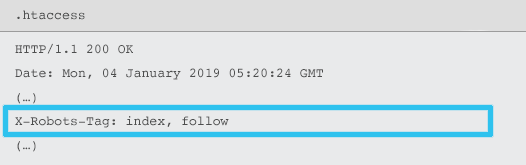
X-Robots-Tag are sent by the server as an element of the HTTP response header for a given URL using .htaccess and httpd.conf files.
Any robots meta tag directive can also be specified as an X-Robots-Tag. However, an X-Robots-Tag offers some additional flexibility and functionality on top.
You would use X-Robots-Tag over meta robots tags if you want to:
- Control robots behaviour for non-HTML files, rather than HTML files alone.
- Control indexing of a specific element of a page, rather than the page as a whole.
- Add rules to whether or not a page should be indexed. For example, if an author has more than 5 published article, index their profile page.
- Apply index & follow directives at a site-wide level, rather than page-specific.
- Use regular expressions.
Avoid using both meta robots and the x-robots-tag on the same page – doing so would be redundant.
To view X-Robots-Tags, you can use the “Fetch as Google” feature in Google Search Console.
Robots Directives & SEO

So now you know the differences between the three robots directives.
robots.txt is focussed on saving crawl budget, but won’t prevent a page from being shown in the search results. It acts as the first gatekeeper of your website, directing bots not to access before the page is requested.
Both types of robots tags focus on controlling indexing and the passing of link equity. Robots meta tags are only effective after the page has loaded. While X-Robots-Tag headers offer more granular control and are effective after the server responds to a page request.
With this understanding, SEOs can evolve the way in which we use robots directives to solve crawling and indexation challenges.
Blocking Bots to Save Server Bandwidth
Issue: Analysing your log files, you will see many user-agents taking bandwidth but giving little value back.
- SEO crawlers, such as MJ12bot (from Majestic) or Ahrefsbot (from Ahrefs).
- Tools that save digital content offline, such as Webcopier or Teleport.
- Search engines that are not relevant in your market, such as Baiduspider or Yandex.
Sub-optimal solution: Blocking these spiders with robots.txt as it’s not guaranteed to be honoured and is a rather public declaration, which could give interested parties competitive insights.
Best practice approach: The more subtle directive of user-agent blocking. This can be accomplished in different ways, but commonly is done by editing your .htaccess file to redirect any unwanted spider requests to a 403 – Forbidden page.
Internal Site Search Pages Using Crawl Budget
Issue: On many websites, internal site search result pages are dynamically generated on static URLs, which then eat up crawl budget and may cause thin content or duplicate content issues if indexed.
Sub-optimal solution: Disallow the directory with robots.txt. While this may prevent crawler traps, it limits your ability to rank for key customer searches and for such pages to pass link equity.
Best practice approach: Map relevant, high volume queries to existing search engine friendly URLs. For example, if I search for “samsung phone”, rather than creating a new page for /search/samsung-phone, redirect to the /phones/samsung.
Where this is not possible, create a parameter based URL. You can then easily specify whether you wish the parameter to be crawled or not within Google Search Console.
If you do allow crawling, analyse if such pages are of high enough quality to rank. If not, add a “noindex, follow” directive as a short term solution while you strategise how to improve result quality to assist both SEO and user experience.
Blocking Parameters with Robots
Issue: Query string parameters, such as those generated by faceted navigation or tracking, are notorious for eating up crawl budget, creating duplicate content URLs and splitting ranking signals.
Sub-optimal solution: Disallow crawling of parameters with robots.txt or with a “noindex” robots meta tag, as both (the former immediately, the later over a longer period) will prevent the flow of link equity.
Best practice approach: Ensure every parameter has a clear reason to exist and implement ordering rules, which use keys only once and prevent empty values. Add a rel=canonical link attribute to suitable parameter pages to combine ranking ability. Then configure all parameters in Google Search Console, where there are more granular option to communicate crawling preferences. For more details, check out Search Engine Journal’s parameter handling guide.
Blocking Admin or Account Areas
Issue: Prevent search engine from crawling and indexing any private content.
Sub-optimal solution: Using robots.txt to block the directory as this is not guaranteed to keep private pages out of the SERPs.
Best practice approach: Use password protection to prevent crawlers accessing the pages and a fall back of “noindex” directive in the HTTP header.
Blocking Marketing Landing Pages & Thank You Pages
Issue: Often you need to exclude URLs not intended for organic search, such as dedicated email or CPC campaign landing pages. Equally, you don’t want people who haven’t converted to visit your thank you pages via SERPs.
Sub-optimal solution: Disallow the files with robots.txt as this won’t prevent the link being included in the search results.
Best practice approach: Use a “noindex” meta tag.
Manage On-Site Duplicate Content
Issue: Some websites need a copy of specific content for user experience reasons, such as a printer friendly version of a page, but want to ensure the canonical page, not the duplicate page, is recognised by search engines. On other websites, the duplicate content is due to poor development practices, such as rendering the same item for sale on multiple category URLs.
Sub-optimal solution: Disallowing the URLs with robots.txt will prevent the duplicate page from passing along any ranking signals. Noindexing for robots, will eventually lead to Google treating the links as “nofollow” as well, will prevent the duplicate page from passing along any link equity.
Best practice approach: If the duplicate content has no reason to exist, remove the source and 301 redirect to the search engine friendly URL. If there is a reason to exist, add a rel=canonical link attribute consolidate ranking signals.
Thin Content of Accessible Account Related Pages
Issue: Account related pages such as login, register, shopping cart, checkout or contact forms, are often content light and offer little value to search engines, but are necessary for users.
Sub-optimal solution: Disallow the files with robots.txt as this won’t prevent the link being included in the search results.
Best practice approach: For most website, these pages should be very few in number and you may see no KPI impact of implementing robots handling. If you do feel the need, it’s best to use a “noindex” directive, unless there are search queries for such pages.
Tag Pages Using Crawl Budget
Issue: Uncontrolled tagging eats up crawl budget and often lead to thin content issues.
Sub-optimal solutions: Disallowing with robots.txt or adding a “noindex” tag, as both will hinder SEO relevant tags from ranking and (immediately or eventually) prevent the passing of link equity.
Best practice approach: Assess the value of each of your current tags. If data shows the page adds little value to search engines or users, 301 redirect them. For the pages that survive the cull, work to improve the on-page elements so they become valuable to both users and bots.
Crawling of JavaScript & CSS
Issue: Previously, bots couldn’t crawl JavaScript and other rich media content. That’s changed and it’s now strongly recommended to allow search engines to access JS and CSS files in order to optionally render pages.
Sub-optimal solution: Disallow JavaScript and CSS files with robots.txt to save crawl budget may result in poor indexing and negatively impact rankings. For example, blocking search engine access to JavaScript that serves an ad interstitial or redirect users may be seen as cloaking.
Best practice approach: Check for any rendering issues with the “Fetch as Google” tool or get a quick overview of what resources are blocked with the “Blocked Resources” report, both available in Google Search Console. If any resources are blocked that could prevent search engines from properly rendering the page, remove the robots.txt disallow.
[oc-redirect num=2]
Best Practice Robots Checklist
It’s frighteningly common for a website to have been accidently removed from Google by a robots controlling error.
Nevertheless, robots handling can be a powerful addition to your SEO arsenal when you know how to use it. Just be sure to proceed wisely and with caution.
To help, here’s a quick checklist:
- Secure private information by using password protection
- Block access to development sites by using server-side authentication
- Restrict crawlers that take bandwidth but offer little value back with user-agent blocking
- Ensure the primary domain and any subdomains have a text file named “robots.txt” on the top level directory which returns a 200 code
- Ensure the robots.txt file has at least one block with a user-agent line and a disallow line
- Ensure the robots.txt file has at least one sitemap line, entered as the last line
- Validate the robots.txt file in the GSC robots.txt tester
- Ensure every indexable page specifies its robots tag directives
- Ensure there are no contradictory or redundant directives between robots.txt, robots meta tags, X-Robots-Tags, .htaccess file and GSC parameter handling
- Fix any “Submitted URL marked ‘noindex’” or “Submitted URL blocked by robots.txt” errors in GSC coverage report
- Understand the reason for any robots related exclusions in GSC coverage report
- Ensure only relevant pages are shown in the GSC “Blocked Resources” report
Go check your robots handling and make sure you’re doing it right.