In the “Redirect loops and chains” webinar on 20 November, Erlé Alberton, Customer Success Manager at Oncrawl, presented different ways to use Oncrawl to manage redirections on your website.
What is a redirect?
Redirects are HTTP status codes that indicate that the page’s content can instead be found at a different URL. This includes specific redirect codes including:
- 301: permanent redirect
- 302: temporary redirect
- 307: temporary redirect that forces the browser to issue a new request for the new URL that is exactly the same as the request for the old URL
Note: Oncrawl has observed, after crawling millions of sites, that the 302 redirect consumes significant crawl budget since Google continues to try to determine whether or not the temporary period is over. Try using 301 redirects instead if you’re trying to optimize your crawl budget.
How does Google handle redirects?
According to Google, redirects are part of a site’s lifecycle. They transmit PageRank to their targets, and they don’t cause problems unless they appear in chains.
IMO SEOs fuss too much about redirects. Use the right one for the job, it’s a technical thing, not a SEO thing; it’s not voodoo magic.
— ? John ? (@JohnMu) September 29, 2016
all redirects pass PageRank now
— Gary “鯨理” Illyes (@methode) September 28, 2016
“IMO SEOs fuss too much about redirects. Use the right one for the job, it’s a technical thing not an SEO thing; it’s not voodoo magic.”
— John Mueller
“all redirects pass PageRank now”
— Gary Illyes
“We follow up to 5 [redirects] in a chain (please keep any redirect chain as short as possible), but you can redirect as many URLs on your site as you want at the same time.”
— Explanation given during a Google webinar
However, Oncrawl’s data shows that the maximum number of redirects followed by Google’s crawlers is often around 16.
What is a chain and what can cause a chain?
A redirect becomes a chain when it points to a target URL that is itself redirected to another URL.
A chain can occur in the following cases:
- When you’ve corrected the title of an article, if your URLs are based on article titles
Original URL -> title correction -> redirect to new URL 2 -> title correction -> redirect to URL 3- What happened: your CSM may create automatic redirections each time you modify the title. Or, if you manually set up rules for the modifications in your htaccss file, old rules may remain in the file.
- Our advice: always start with the current state in order to create new rules, then modify all old rules to point directly to URL 3.
- After redesigning a website multiple times
Original URL -> redesign -> URL 2 -> redesign -> URL 3…- What happened: when you redesign a website, you (hopefully) write redirect rules in your htaccess file. A few months later, a part of the site is redesigned again. The new rules are added to the old ones in the htaccess file, creating series of redirects.
- Migrating to HTTPS or changing domain names
http URL (without www) -> http URL (with www) -> https URL (without www) -> https URL (with www)
http URL (without www) -> https URL (without www) -> https URL (with www)
http URL (with or without www) -> http URL (old slug) -> http URL (new slug) -> https URL (new slug)
http URL (with or without www) -> https URL (old slug) -> https URL (new slug)- What happened: URLs are redirected according to your rules to the correct URL. Often, this also includes a redirect step, whether automatic (in the case of www subdomains) or not (when you’ve added a rule to correct a URL), before and/or after the HTTP to HTTPS redirect.
What is a loop and how do loops get created?
A redirect loop is a closed redirect chain. One of the links in the chain is redirected to a URL that is already part of the same chain. After approximately 20 redirections, which is inevitable in a loop, the user never sees the page.
What statistics are available in Oncrawl?
In the Crawl Report, Oncrawl offers 5 main charts on the subject of your website’s redirects. The charts can be found under Indexability, then Status codes.
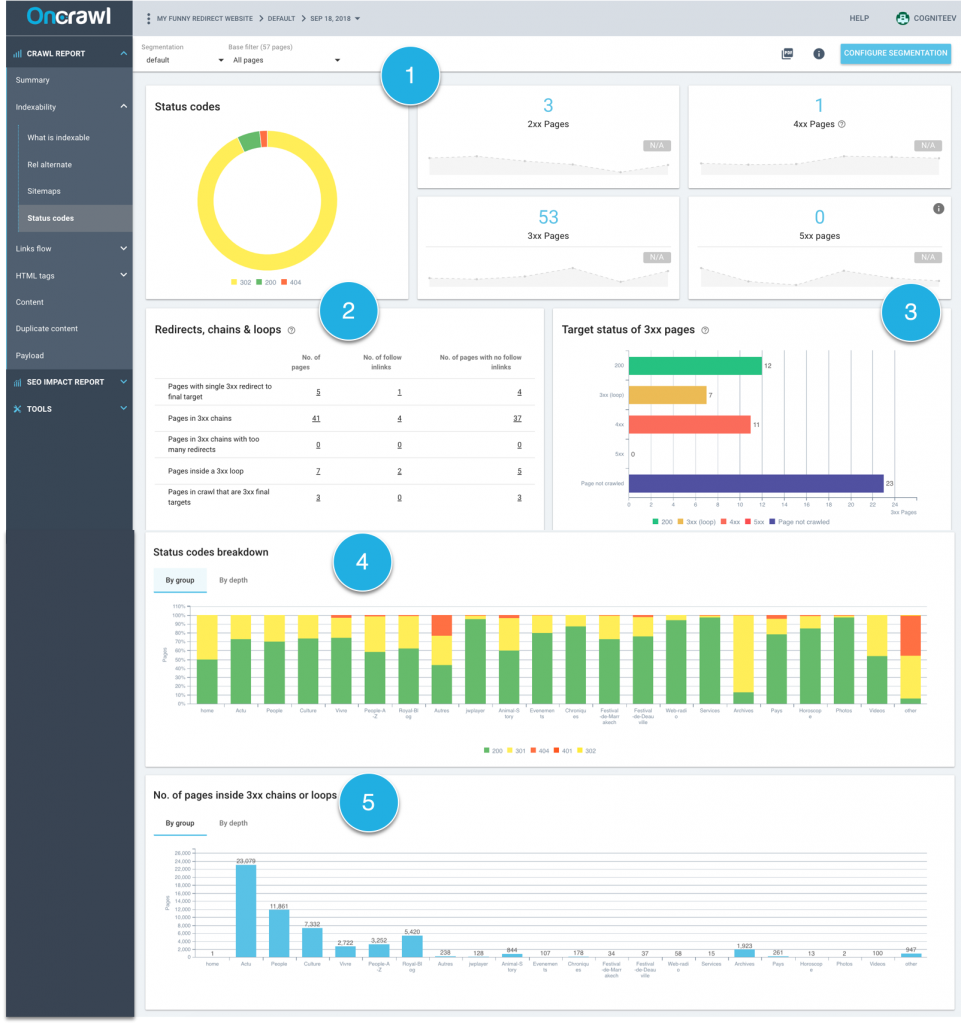
1. Breakdown of HTTP status codes for the entire site
This chart has been around for a while in Oncrawl and lets you keep track of the percentage of pages that are redirected (with a status code of 3xx) on your website.
2. Table summarizing all redirects
For each redirect type, this table gives the number of associated pages, and more importantly the number of links that point to the pages in the redirect loop or chain.
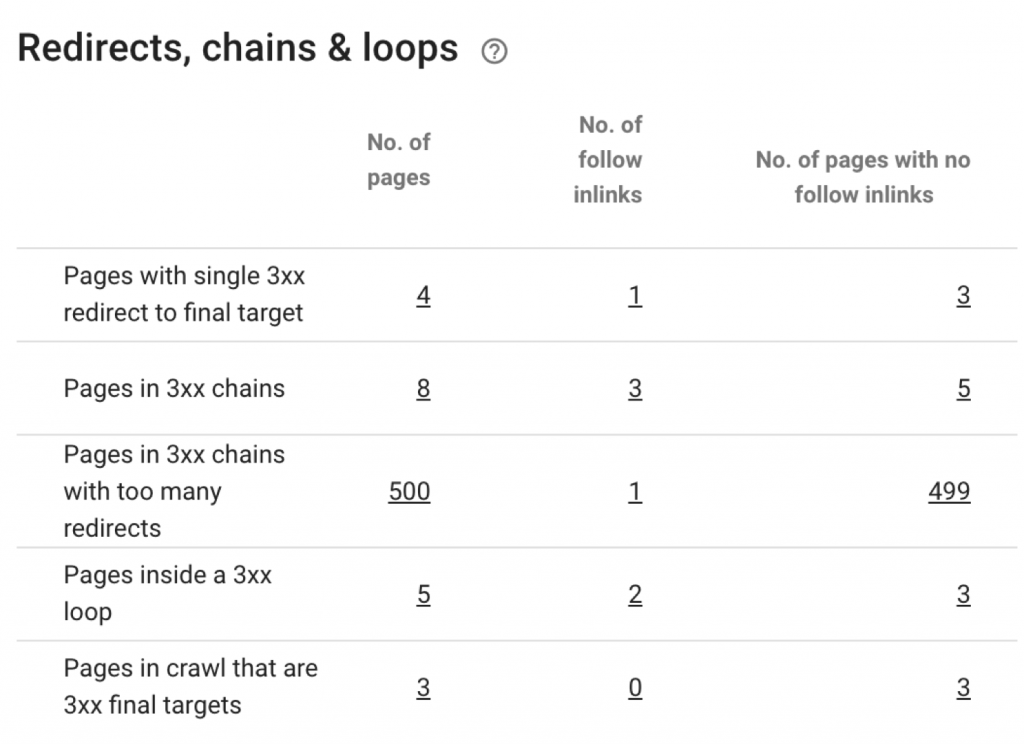
There are several types of redirect:
- Single redirects: simple redirects from URL A to URL B, where no additional redirects occur. Simple redirects do not cause problems for your SEO. They can be used to conserve PageRank received on old URLs if you have backlinks that point to them. Be careful of internal links that point to the “wrong” part of the redirect: you’ll need to update them to point to the target URL.
- Pages in 3xx chains: a series of 2 or more redirects. These redirects are evaluated from end to end. You can find the number of pages involved and the number of links that point to any part of the chain. By clicking on the numbers, you can find the list of URLs they represent. Then, it’s up to you to correct them to point to the final URL.
- Pages in 3xx chains with too many redirects. Oncrawl stops exploring a chain after 500 redirects!
- Pages inside a 3xx loop: loops are created when one of the pages in a chain redirects to another page in the chain. Consequently, there is no final page in this series of redirects.
- Pages that are 3xx final targets: pages that are targets of a redirect but that don’t redirect to another page. If the final target page cannot be crawled, it won’t be included in these numbers. We’ll let you determine the specific reasons why you might have forbidden crawlers on a given page.
3. Chart of the final state after redirects
This chart allows you to answer the question: once Oncrawl has finished crawling all of the steps in the loop or chain, what is the status of the final destination page?
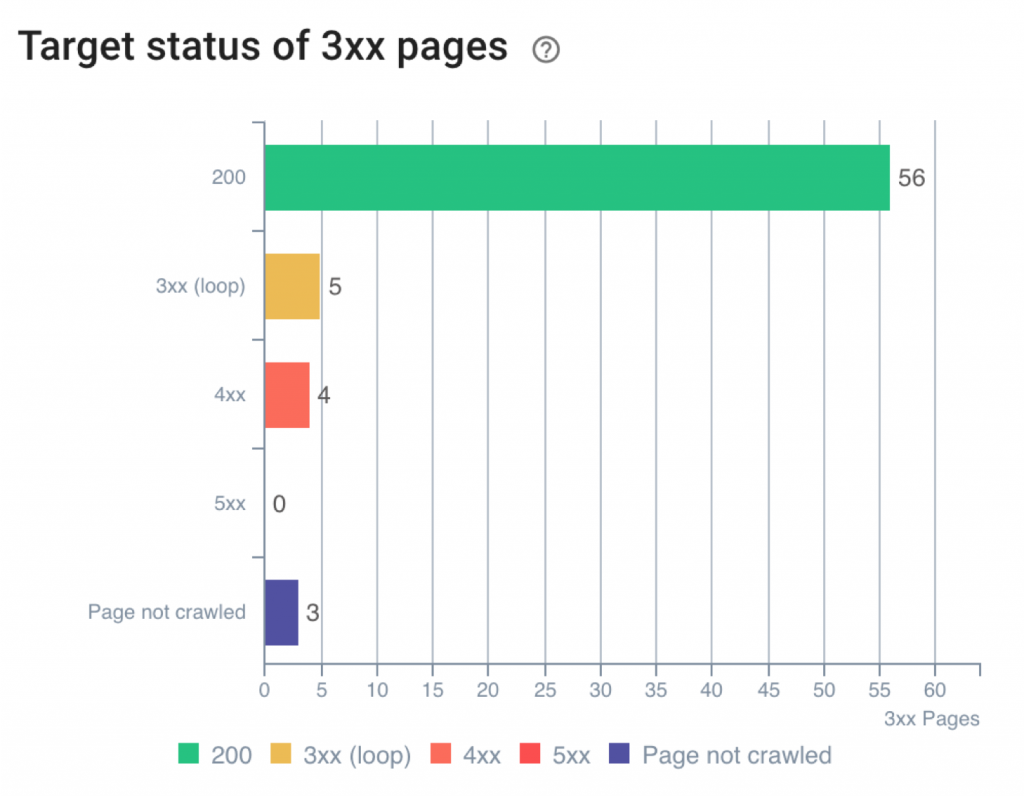
The chart shows the different possible answers:
- 200: the final page works fine
- 3xx (external): the final page is on a different site, but is also redirected
- 4xx: the final page can’t be found
- 5xx: the final page returns a server error
- Not crawled: the Oncrawl bot couldn’t reach the final page: it may be that the page is in a subdomain that isn’t included in your crawl, or the page may be listed as robots denied in the robots.txt file.
Correcting final pages in 3xx, 4xx and 5xx can be extremely worthwhile.
Begin with the 4xx and 5xx (error pages) before moving on the pages in 3xx (these are the pages that are part of chains and loops).
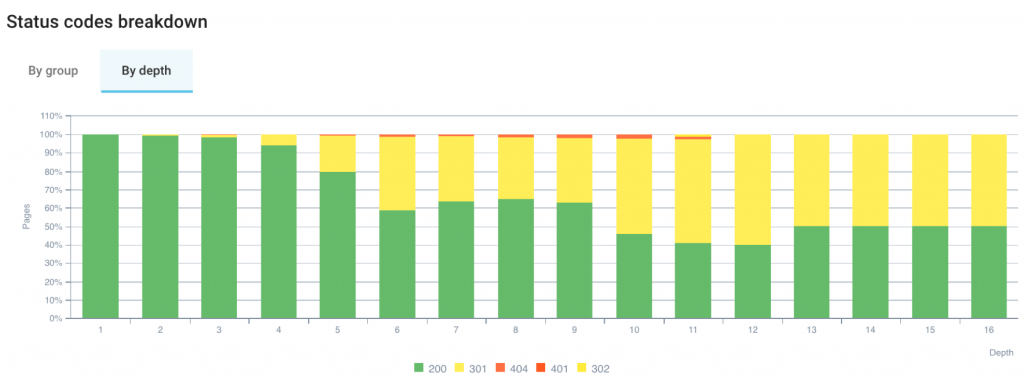
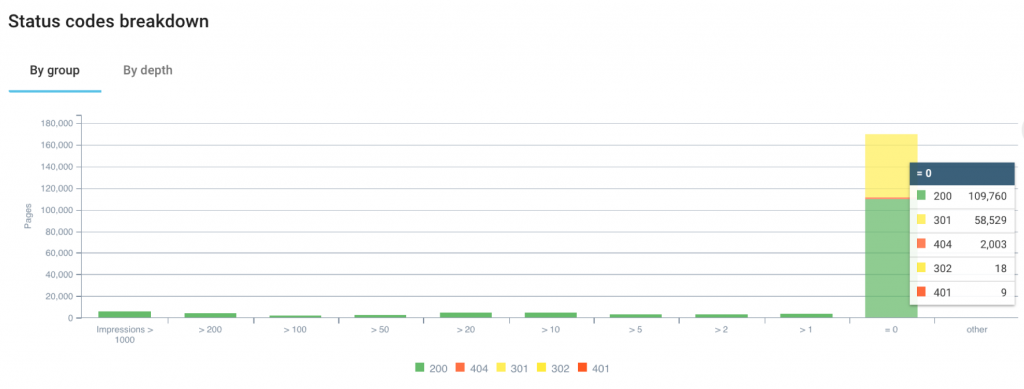
4. Breakdown of status codes by page groups and by depth
This chart can be viewed either by page groups or by page depth. The version based on page groups allows to you use Oncrawl’s segmentation, which can group pages based on any Oncrawl metric.
A few examples:
- Using a segmentation for pages that rank or don’t rank;
- What proportion of my pages that don’t rank return 4xx or 5xx ?
- With a segmentation based on the number of impressions in GSC;
- Are there pages that have no impressions and that are affected by a chain with a final destination page that doesn’t have a 200 status?
In the second tab, you can view the status code based on the page depth in the website. In general, the deeper the page is located, the greater the number of redirects.
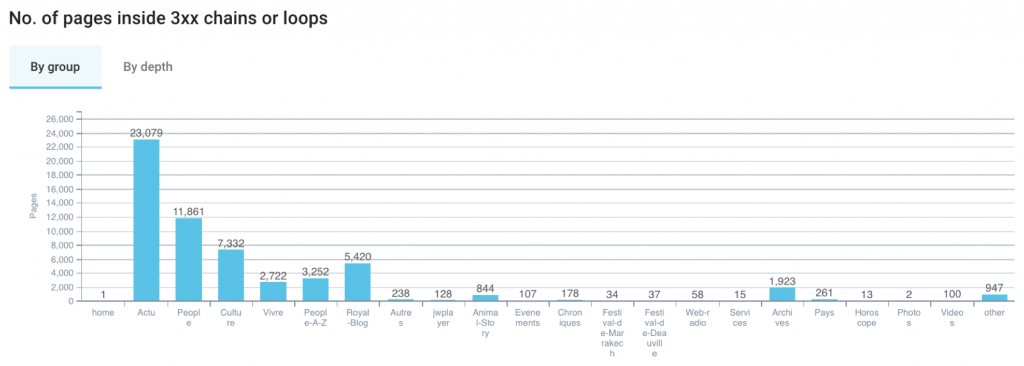
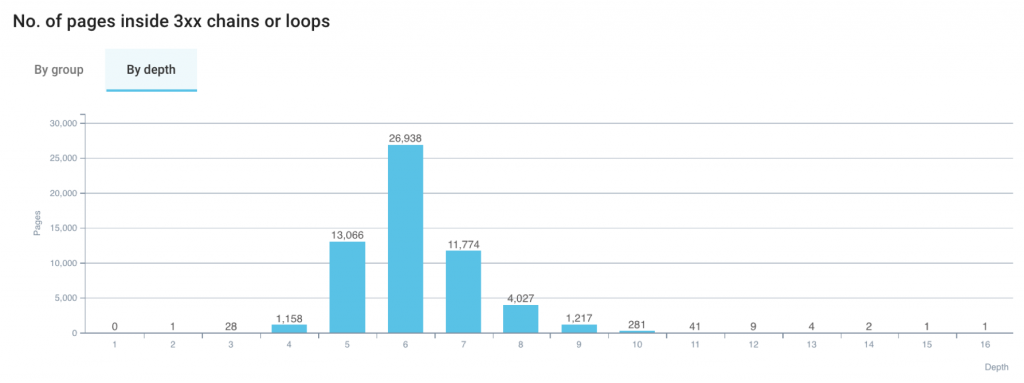
5. Breakdown of pages in chains or loops by page groups and by depth
This chart adapts to the segmentation you choose.
This chart can also be viewed by depth, so you can see where the pages involved in redirect loops and chains are located.
What to do to manage your redirects
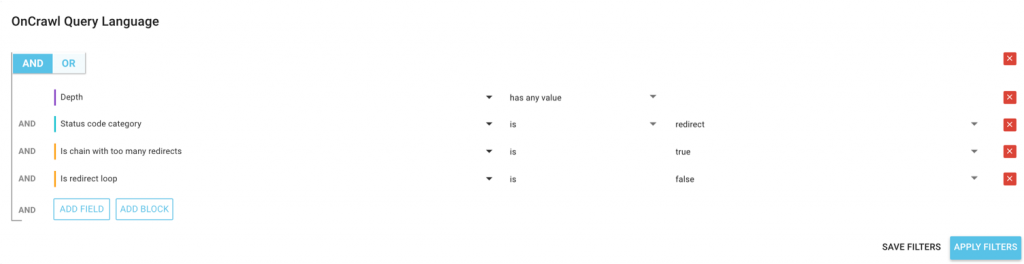
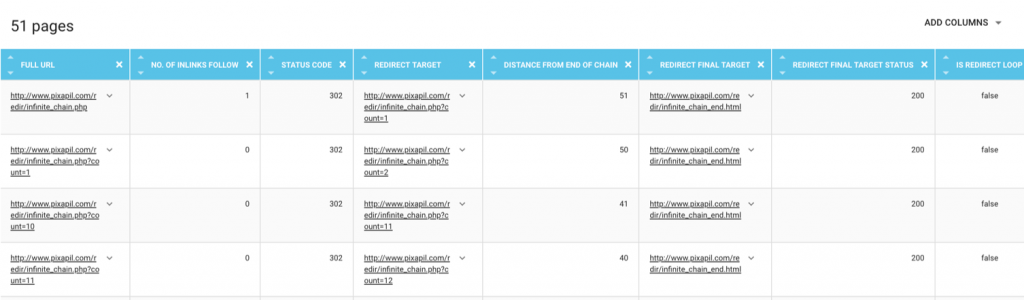
- 1. List the pages affected
Final destination pages of loops and chains. This will give you a good idea of the pages to correct or to keep crawlers away from.
Top priority: Pages in a loop. Loops are the most important element to correct.
Top priority: Pages in chains with too many redirects. Like loops, correcting chains that are too long is a top priority.
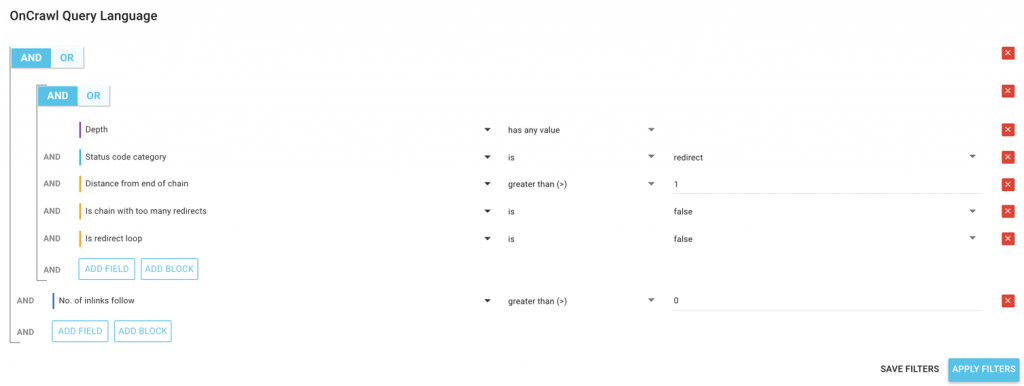
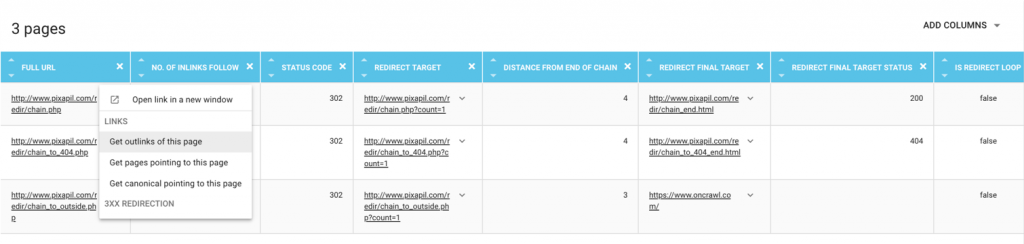
- 2. Change links to affected pages
Links can be updated to point to the chain’s final page, or set to “nofollow” to keep the link from being crawled.
Priority depending on your situation: Links to final destination pages of chains. This will give you a good idea of the pages to correct or to keep crawlers away from..
Top priority: Links to pages in a loop. Loops are the most important element to correct.
Top priority: Links to pages in chains with too many redirects. Like loops, correcting chains that are too long is a top priority.
Priority 2: Links to pages in chains.
Priority 3: Links to pages with a single redirect to the final target.
How to list pages or links affected by a redirect?
When you click on an metric in Oncrawl, you switch directly to the Data Explorer, with a pre-set filter that lets you view the details for the information on which you clicked.
For example, by clicking on the number of pages that aren’t in a loop but are in a chain with too many redirections, you go straight to the report listing all of the URLs that meet this criteria. You can adjust the filter to have it show you all of the pages that are in loops, for example.
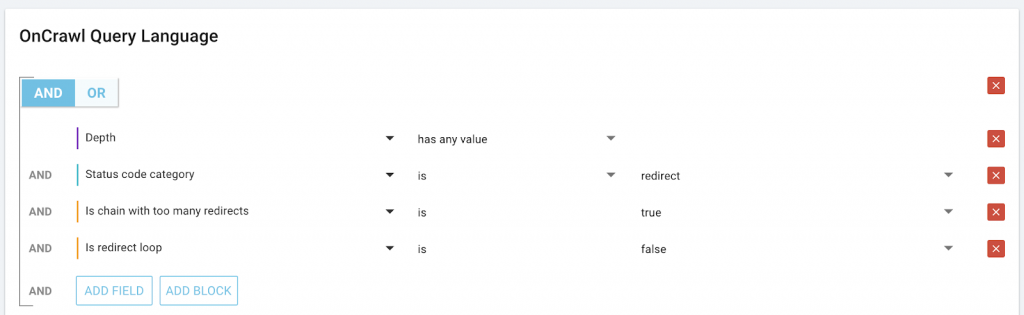
Similarly, you can explore all of the links that point to a page:. For example, in the case of all pages that are redirected, the “Pages pointing to 3xx errors” QuickFilter will show you all of the links that point to redirected pages.

For those of you using the Oncrawl API, you also have a way to list links that point to pages, using cross-requests. We won’t go into detail here, but you can obtain all links by the type of redirect, with their anchors and even the amount of juice that they pass.
How to test redirects on your site without running a crawl?
You can get an initial diagnosis for redirects even before you run a crawl.
We recommend testing your Start URL before crawling. Oncrawl will automatically validate your Start URL as soon as you enter it in the crawl settings. If your Start URL isn’t valid, it could be because of different reasons:

Start URL is redirected to a page in 200 – Start URL is redirected to a page in 400 – Start URL is part of an unresolved chain
- Your Start URL is redirected. This case can be a little particular. For Erlé, if he needs to crawl a website, he will always start from the URL of the domain. Even if Oncrawl says that this URL “seems to be redirected…”, he will continue to use this URL, because it’s extremely useful to analyze the site in this case. The alert that appears in the case of a redirected Start URL isn’t an error. It’s only additional information.
- Your Start URL returns an error. On the other hand, it’s possible to enter a Start URL that is redirected to a page the returns an error. In this case, the crawler can’t go any further.
- Your Start URL is part of a loop. In this case, Oncrawl lets you know that the crawl is impossible. Oncrawl can’t determine the final target for the first URL, since it’s already part of a loop.
Going further
Analyzing your redirects with the right segmentation
“Status codes breakdown”
An SEO optimization always starts with a page’s possibility to gain more impressions. By applying a segmentation based on ranges of impressions from GSC, we can see the pages that have 0 impressions in GSC over the last 45 days. This allows us to discover that some of these pages respond with 3xx and 4xx.
You can, of course, you a different segmentation to better view additional characteristics of your data.
“No. of pages inside 3xx chains or loops”
This chart provides an overview of the number of pages that are affected. Again, it’s organized by group, or by depth depending on the tab you use.
By group, we can tell at a glance the type of group that is most affected by redirect loops and chains.
By switching to the other tab, we can see at what depth pages appear in loops and chains. But just because we’re looking at depth doesn’t mean that we can’t use a segmentation.
If you have the URL-based segmentation provided by default in Oncrawl, use the second filter at the top of the page to target a particular page group in the segmentation. You can then use this chart to see the breakdown of depth in your site structure for pages in this group.
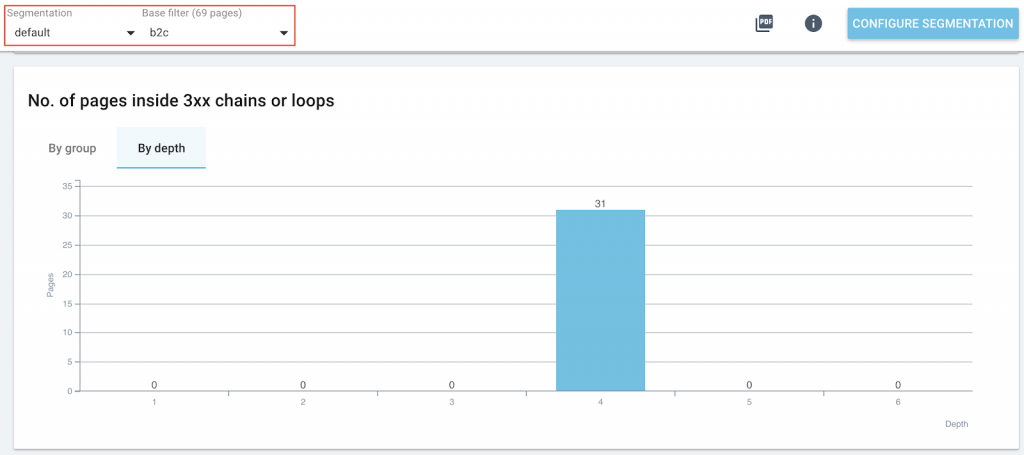
Remember that a page that isn’t very deep in the site has better chances to be indexed than a page that is deeper. The strategy above helps to focus on the most important groups on your site and on the pages that are placed the highest in your site structure, in order to prioritize your SEO actions.
Adapt your reports and segmentations
Oncrawl is based on metrics. And like all Oncrawl metrics, the metrics related to redirect analysis are available in the Data Explorer.
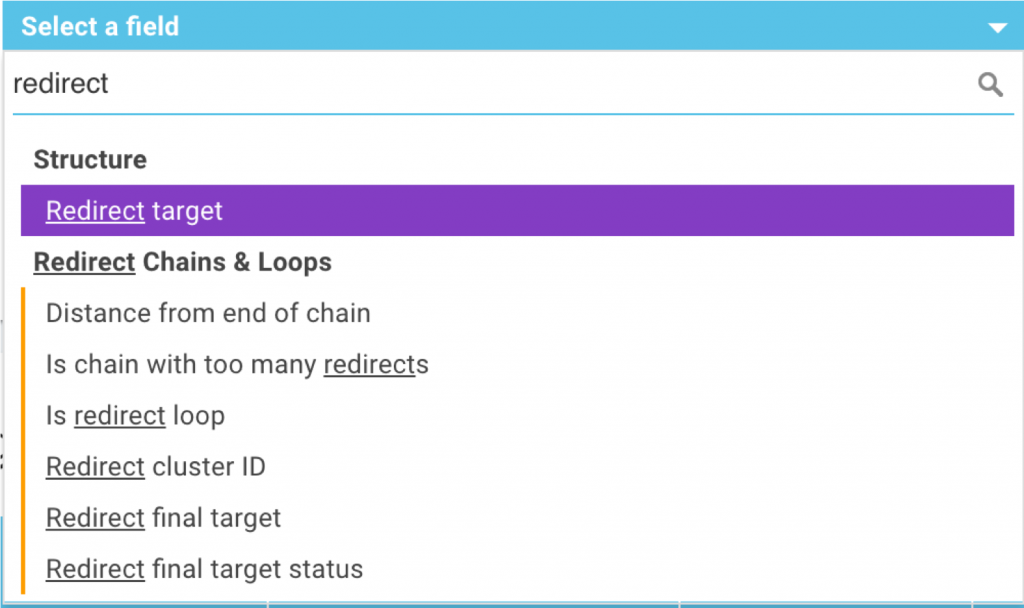
You can add the following data to your reports:
– The target of the redirect
– The distance (in number of redirects) until the end of the chain
– An indication of whether the page is part of a chain with too many redirects
– An indication of whether the page is part of a redirect loop
– The ID number of the cluster. All of the pages that are part of the same cluster are found in the same redirect chain or loop.
– The final target page for a chain and its HTTP status
You can also use these metrics to create Oncrawl segmentations. For example, this allows you to group your pages according to the number of redirects in their chain or to target small or large redirect chains. We can also look at characteristics of pages based on their distance from the end of a chain: 1 redirect, 2-5 redirects, 6-10, 11-20, more than 20…
Check the visual representation of redirects in the “URL Details”
The URL details explorer contains information about a page’s redirect chain.
From the Data Explorer, you can click on a URL to get more details, including redirect information.
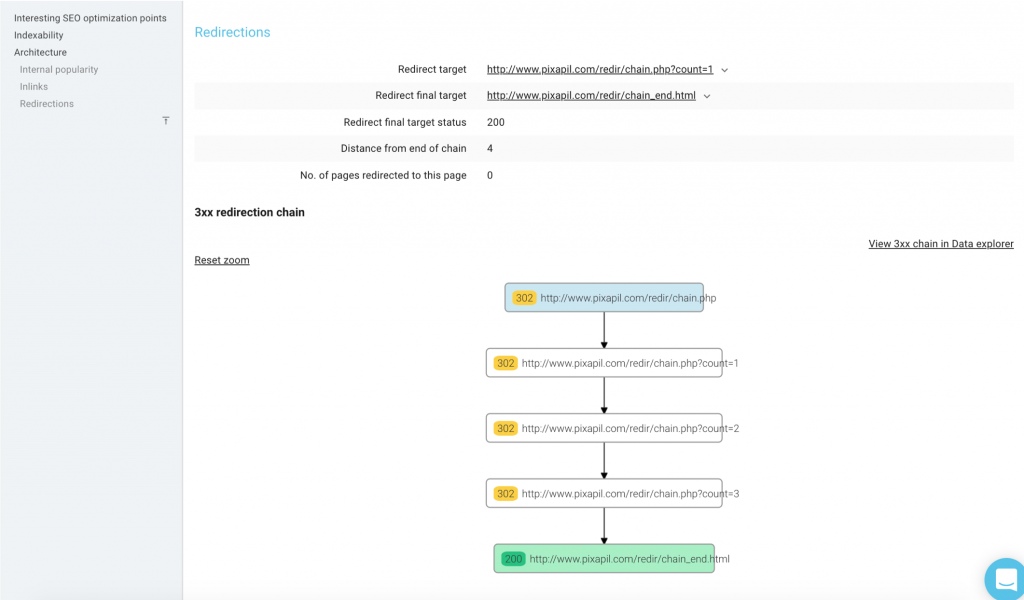
On the URL Details page, there is a variety of data regarding this page’s redirects. There is also a visual representation of the redirect chain. This visual includes:
– The start of the chain
– The status of each page in the chain
– The final target of the chain (in green)
– The current URL
This visual is also available for loops. The page status codes and the redirect path are represented the same way as for chains.
A few best practices
During the webinar, Erlé offered the following advice:
- Each URL in the chain should redirect to the final URL!
- Each link to a URL in the chain should point to the final URL!
- First, fix loops. Then fix 4xx and 5xx errors.
- Set up your crawl with a Start URL as high in the site structure as possible.
- When doing redesigns or migrations, create crawl configurations that use the 100 redirect rules found in your htaccess and run the crawls regularly (once per week) to check that your redirect policy is still in place.
- Make sure you cut series of redirects down to one single redirect (don’t forget about your backlinks!)
Top SEOs pitched in to the discussion on Twitter to add additional best practices for redirects:
However we should aim at redirecting to the final URL without additional chains.
— Maria Cieślak (@McCieslak) November 22, 2018
Yeah, aim for direct-to-target redirects. Redirects slow things down, especially on mobile, especially cross-host. We crawl 5 chained in one go, and take it from there the next time we crawl. Crawlers are great at spotting these issues for you!
— ? John ? (@JohnMu) November 22, 2018
It’s also key to look for the causes of chains 1) site launches 2) automated redirect tools (i.e. when a URL is altered) and 3) an active content team.
ID’ing and fixing is relatively easy when you’re looking, however it’s most cost effective to address as point of process
— Chris Green (@chrisgreen87) November 22, 2018
Make sure internal links point to final redirection targets. 😀
— Señor Muñoz (@senormunoz) November 22, 2018
My answer is here: https://t.co/rsrXsZLsl6
Basically, I hate them ??
— Omi Sido (@OmiSido) November 22, 2018
Something people do not sometimes think about is redirecting images while working on their website redesign. ?
— Alice Roussel (@aaliceroussel) November 22, 2018
especially if the site has 1M+ urls, crawling can become tricky so we need to avoid redir chains asap by regularly monitoring site health via automated crawl analyses
— Murat Yatagan (@muratyatagan) November 22, 2018
How to find more information about redirects in Oncrawl?
The slides from this webinar are available on Slideshare (in French).
If you’re interested in this feature, it is included as part of the standard crawls in Oncrawl. The only thing you need to do is have run a crawl after the feature was released.