
What is lazy loading?
Lazy loading is a technique to increase page speed by deferring the loading of big elements–like images–that are not needed immediately. Instead, these elements are loaded later, if and when they become visible.
Typically, elements that are not in the viewport (that is, anything below the fold when the page first loads), are good candidates for lazy loading. They won’t be seen until the user scrolls them into view. If they don’t load immediately, the user’s experience of the page is not affected.
In fact, in their Lighthouse documentation, Google subtly recommends using lazy loading for images below the fold to improve page load time.
Lazy loading includes infinite scroll, a method of continually loading more content every time a user reaches the end of the current content on the page. This is one way to replace pagination on feeds, social networks, product lists, or other very long pages.
How lazy loading works
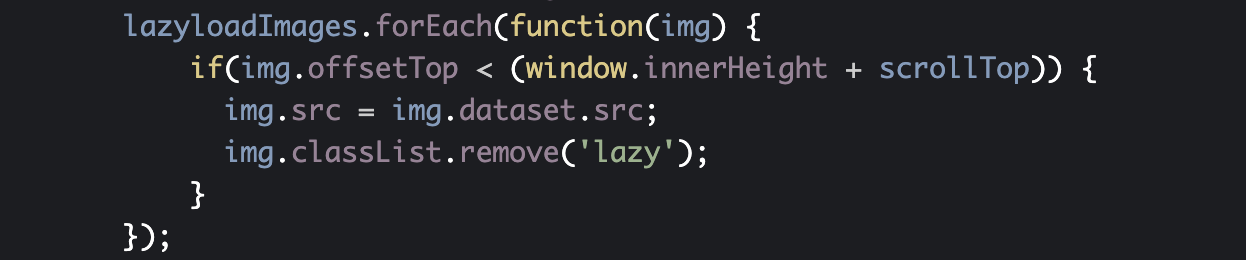
Lazy loading can be implemented in many ways using JavaScript. Most web developers will choose an existing library that manages the process. A typical process includes the following steps:
- Identify elements in the HTML that will be lazy loaded and prevent their normal loading.
This is often accomplished intags by placing the image URL in an attribute other than “src”. A common alternative attribute is “data-scr”. In CSS background images, a common method is to use a “lazy” class to override the “background-image” property.

- Monitor what is visible in the viewport or listen for events that indicate that the visible parts of the page have changed.
Each script handles this differently. Common methods include listening for interaction events such as scrolling on different HTML tags, window resizing, or mobile orientation changes. Alternatively, using the Intersection Observer API, scripts can also directly track whether an element is visible or not, which removes the need for event listeners.

- Trigger loading the lazy load elements shortly before or when they become visible.
When lazy load elements are visible (or within a range of the visible area), the script places the URL in the “data-src” attribute in a “src” attribute fortags or removes the “lazy” class from the CSS, and the browser loads the image.
Can crawlers handle lazy loading?
As it is often the case in SEO, the answer is “yes—but it depends.”
Crawling JavaScript
Crawling a site that uses lazy loading touches on at least two issues. First, the question of crawler support for JavaScript, and second, the crawler support for the specific lazy loading techniques used on the site.
Most modern crawlers, including search engine bots, support most JavaScript. In Google’s case, there may be a delay in indexing content loaded with JavaScript such as lazy-loaded images, but this content can be both crawled and indexed. We’ll go into more detail on how Google handles lazy loading below.
If you missed Maria Cieslak’s piece on how to use JavaScript and optimize for SEO, it’s worth a look for a reminder on how to ensure your JavaScript is SEO-compatible.
Crawling lazy loading
Beyond the question of JavaScript in general, crawlers do adapt to cover use of lazy loading. They use different strategies to activate lazy loading and render lazy-loaded content. Here are some of the top crawl strategies for lazy loading content:
- Extended viewport heights
Crawlers that support lazy loading often use very tall viewports. Essentially, this pushes the famous “fold” down as far as possible. This ensures that a maximum amount of content is already in the viewport when the page is first loaded. - Triggering scroll events
Some crawlers will attempt to scroll the page. They will then wait to see if this launches a script that adds new content. A very diligent crawler may theoretically perform a scroll-and-wait action multiple times, but this process is costly in time and doesn’t always produce results. Unlike users, scrolling can be complicated for crawlers. Working without eyes, they are unable to tell which part of a page needs to be scrolled. Even crawlers that are willing to scroll and wait may scroll the wrong HTML element. For example, scrolling the wrong <div> won’t trigger the script’s scroll event listener, despite the crawler’s best efforts. - Reading content in <noscript> tags
Some crawlers will read content place in <noscript> tags. This is content that the page developer placed on the page to be loaded only if the browser refuses or is unable to execute scripts. This allows the crawler access to the content that would be lazy loaded even if the lazy load is never triggered.
Does Google index lazy loading?
Google has repeatedly confirmed that it does index content that it can successfully render. This includes lazy load content.
How Google handles lazy loading
Like other crawlers, googlebots implement strategies to handle lazy loading.
Scrolling
1 – Gary Illyes “no search engine scrolls”
2 – John Mueller: “we do scroll a little bit”
Source 1 – https://t.co/cCLO3nF02u
Source 2 – https://t.co/uOMaLepCu7 #pubcon ????????♂️— Natzir Turrado (@natzir9) October 17, 2018
The jury is still out on scrolling.
A Yoast user’s test with Fetch and Render (now the URL Inspection Tool) in Google Search Console showed in August 2018 that images are correctly loaded when using lazy loading with WP Rocket. Yoast answers the user’s question and reports that Google handles lazy loading using scroll-and-wait strategies but doesn’t cite sources for its description of Google’s behavior, which leaves room for doubt.
In October 2018, Gary Illyes announced at PubCon that Googlebots do not scroll.
This announcement seemed to be pretty cut-and-dry. However, John Mueller had announced earlier that he “think[s] we do scroll a bit” based on the fact that when he’d tested it, additional page views were being indexed per page with infinite scroll.
Viewport height
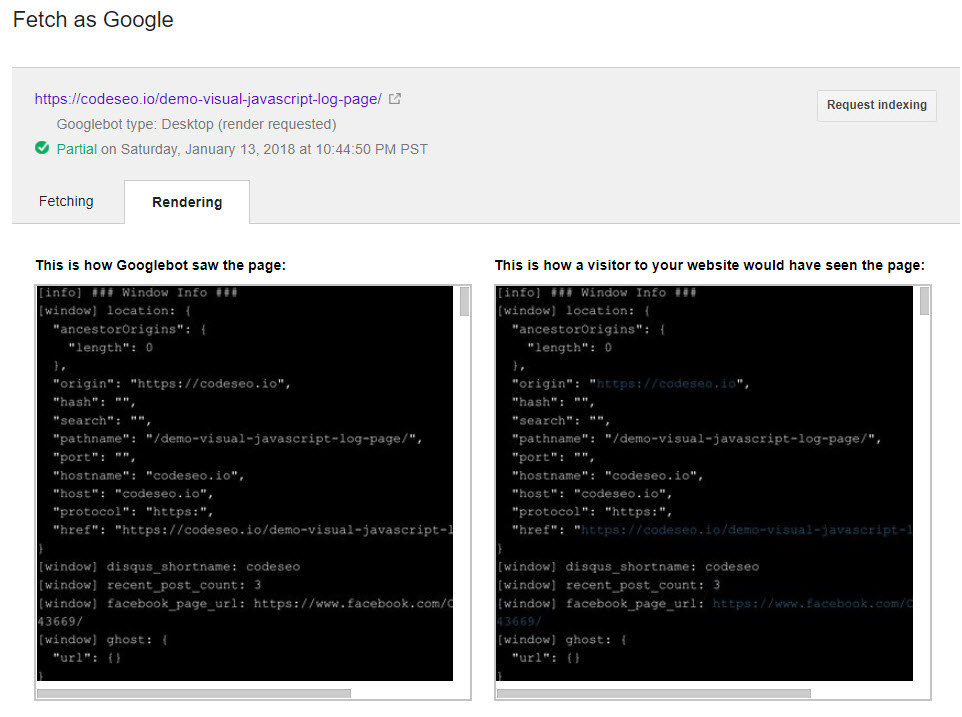
The results of John Mueller’s tests might be explained—for certain implementations of lazy loading—by the increasing height of the viewport used by Googlebots: around 10,000 pixels for desktops, and slightly taller for mobiles.
Attribution: J.R Oakes
J.R. Oakes measured the actual viewport sizes used by googlebots last year as 431 pixels wide by 12,140 pixels high on mobile and 768 pixels wide by 9,307 pixels high for desktop.
Noscript content
Despite conflicting information, it seems that Google often ignores the <noscript> tag, but might use content within it for indexing images.
From Google I/O @JohnMu session on lazyloading images 🙂 pic.twitter.com/kHhmu2DGsg
— Dawn Anderson (@dawnieando) October 17, 2018
Google’s recommendations for website creators
Google published a long-awaited developer guide in November 2018 on the subject.
This guide covers three main recommendations:
1. Load content when it’s visible in the viewport
In the October 30th Google Webmasters Hangout, just before the developer guide was published, Martin Splitt covered the question of how to trigger lazy loading.
Specifically, he advised against relying exclusively on scroll events, despite the fact that scroll events are one of the most common lazy loading triggers.
He listed the following reasons not to use scroll events as your only trigger:
- It’s costly in terms of code, calculations, and data transferred.
- It doesn’t take into consideration other events, like resizing a window, that can change what appears in the viewport.
- Google doesn’t scroll.
2. Support paginated loading for infinite scroll
With mounting evidence for Google not scrolling pages during crawls, infinite scroll might look like something to avoid.
However, there are ways to implement infinite scroll to allow Google to index the lazy load content below the fold. The guide mentions paginating loading, which also allows Google to link to a point within the page.
Google suggests using the History API, which dynamically updates the URL in the browser as additional pages are loaded and scrolled into view.
3. Test your implementation, particularly in Chrome
JavaScript implementations lack standards, and browser capabilities vary greatly. Once you’ve decided on an implementation method for lazy loading, make sure you test it.
You can do this programmatically using the Puppeteer script to pilot Chrome—or, more precisely, Chromium, the browser Chrome is based on.
You can also use:
- Google’s URL Inspection Tool to get a first look
- Google Chrome Lighthouse audits, in the Offscreen Images section
- The developer tools in the Chrome browser, under Network, then Images.
Does Oncrawl support lazy loading?
Yes, Oncrawl supports lazy loading!
The Oncrawl bot not only uses a 10,000-pixel viewport height, but we also use the scroll-and-wait technique to make sure we’ve seen all of your content.
This makes use of the maximum height supported by Chromium, which is both the OpenSource browser behind Chrome as mentioned earlier, and the browser that the Oncrawl bot’s rendering ability is based on.
Although this may or may not be a behavior that Google employs, we do our best to trigger scroll events in case you’re using an event listener for that.
If you’re using or considering Oncrawl to crawl your site and are concerned about support for your particular lazy loading implementation, reach out to us for more details on our crawl strategies for lazy loading.
We make our users’ configurations a priority when addressing crawler limitations, so even your unique and creative lazy-loading technique may be something we’re able to work with.
Create crawlable and indexable lazy loading
To recap, the extensive variety of lazy loading scripts, libraries, and techniques make lazy loading a sticky point for many crawlers. If you’re optimizing a site that makes use of lazy loading, use techniques that are accessible to crawlers.
Based on what we know about Google’s crawling and indexing, here are our top five tips for implementing lazy loading in the best possible way for SEO.
- Read and follow Google’s guidelines for lazy loading.
- Use as little JavaScript as possible and only lazy load elements that aren’t immediately visible to users.
- Use <noscript> tags for images to increase their accessibility.
- Choose your lazy load library carefully based on how it implements different functionalities.
- Use modern and recommended APIs:
- Use the Intersection Observer API to detect the presence of elements in the viewport, rather than relying only on scroll events. (Note that this is a newer API and may not be supported by older browsers.)
- Use the History API to implement paginated infinite scrolling.
And a bonus: keep up with the news!
Native <img> lazy-loading is coming to the web! https://t.co/LgF7F1iMgR <img loading=lazy> defers offscreen images until the user scrolls near them. Shipping in Chrome ~75 https://t.co/4gR7lvx4zx pic.twitter.com/luCHEfLkKD
— Addy Osmani (@addyosmani) April 7, 2019
In the words of Google’s Martin Splitt:
Ohh I would like to comment that lazy loading, when done right, is great. Just some JavaScript libraries have issues that are hard to spot.
— Martin Splitt @ ???????? #smx #muc (@g33konaut) October 31, 2018