
The analysis of HTTP status codes with Oncrawl is an essential part of a technical SEO audit, it allows you in a few clicks to take stock of the error codes within the structure of your site. All you have to do is check that these HTTP status codes are indeed those expected, and if necessary, apply corrections and correct your internal linking.
This article explains the SEO impact of the main HTTP status codes and how to optimize their use to get the best out of them. Before continuing you can read our article dedicated to HTTP status codes and their meaning.
HTTP status code 200
200 OK
The request made to the server succeeds, everything is normal. The page in question can be crawled (if not blocked by robots.txt) by Google bots and other search engines.
Be careful though, this does not mean that there is no action needed for this page and that the HTTP status code is the one expected. In some cases, pages in error or non-existent may respond in 200 while it is not optimal from an SEO point of view.
These pages can be identified on Oncrawl with a combination of several criteria:
- Present in the Other group which contains the uncategorized pages of your segmentation
- Very low word count
- Canonical tags that do not match
- Very high similarity rate
- Non-optimized title and description tags
- Duplicated H1, Title, Description tags
- Pages without H1
As we will see in the rest of the article for these erroneous pages, it will not only be necessary to remove them from the internal linking but it will also be preferable to make them respond with a status HTTP code more useful for SEO.
Best practices:
- Make sure that the pages you want to index respond in 200
- Make sure that the pages that respond in 200 are “real” pages to control its internal linking and its crawl budget
HTTP 3XX status codes
301 Moved Permanently
The requested page has been moved and redirected to another URL permanently. Very useful in SEO, the permanent redirection allows to manage cases of site migration of any type (change of domain, http migration to https, redesign, etc.) but especially to modify the URL of a page without losing the incoming traffic.
The Google bot will no longer be able to access the original page and will follow the redirection to discover the destination page. It will understand that the page has been moved and that the original page should no longer be crawled.
Consequences for your SEO:
- Eventually the original page will be de-indexed
- The destination page will be indexed but there is no guarantee that it will recover the positions of the original page
- The SEO juice of the backlinks received on the original page is transmitted to the destination page
This last point is an essential asset of your SEO strategy in the context of a migration or simply updating the content of your site. If Google recommends to set up 301 redirects only to the same or similar content, and therefore not to automatically redirect to the home page, you must take into account the backlinks that the original page receives. If the page does not exist or no longer exists but receives interesting backlinks, it is wise at least to set up a 301. If there is no similar content, the redirection must be done to the parent page in priority on the home page by following the tree structure of the site (we can base ourselves on the breadcrumb trail or the folders in the URL). For example, for a product page, we will redirect to the product listing rather than the home page.
The logic is different for the internal linkage of your site. It is preferable to correct all links pointing to pages in HTTP 301 status codes but given the fact that the SEO juice is transmitted, do not make it a priority. On the other hand, all redirects pointing to pages that do not respond in 200 should be treated as a priority.
Best practices:
-
- Make sure the destination page responds in 200. Oncrawl makes it easy to detect redirect chains and redirects that do not point to a page in 200
- Correct links pointing to pages in 301
- Limit the use of 301 with an automatic redirection of all 4XX errors to the home page
- Prefer the parent section to the homepage for redirects without similar content
- Set up a redirect if :
- Content is moved
- A similar content replaces the original page
- The page is deleted but receives interesting backlinks
302 Found
The requested page is temporarily redirected to another URL. Like the permanent 301 redirect, the temporary 302 redirect keeps incoming traffic with a seamless user experience, but it doesn’t offer the same SEO benefits. The Google bot will understand that the original page is temporarily inaccessible and will be again.
Consequences for your SEO:
- The Google bot will continue to try to crawl the original page
- The original page will keep its popularity
- The SEO juice of the netlinking will not be transmitted to the destination page
- The original page will not be de-indexed (if the page is not indexed, it will not be as long as it responds in 302)
It is therefore unnecessary to correct your 302s within the internal linking, but it is recommended to regularly check that the 302s, detected in your structure using a crawl or logs, are indeed temporary.
Best practices:
- Use the 302 only for temporary needs, like maintenance for example
- Don’t use 302s for content that has been moved or permanently deleted
- Replace 302s with 301s if they become permanent
304 Not Modified
The requested page has not been modified since the last consultation. The page in question does not need to be crawled again by the Google bot, which will use the cache version. This HTTP 304 status code is not well known, but it offers the possibility to save crawl budget. The Google bot will use the cached version and instantly access the requested page.
Consequences for your SEO:
- The page is not crawled again which avoids the consumption of resources and crawl budget
- The loading time of the page is improved (cache version)
The implementation of this type of response for “classic” pages can be difficult and require development. On the other hand, for resource pages of CSS type it can be a real quickwin.
Best practices:
- For pages that are never modified, prefer 304 to 200
- Study the possibility to generalize the practice for resource pages
HTTP 4XX status codes
404 File Not Found
The server did not find any page for the requested URL, which means that the page does not exist. This can be temporary or permanent, usually the page is accessible via a non-functional link or by a user typing the wrong URL.
Consequence for your SEO:
- Google bot understands that this page does not exist and that it should not be indexed
- If the page is already indexed, it ends up being deindexed
- The SEO juice of netlinking will be lost once the page is deindexed
Often seen as the error to correct at all costs in SEO, the HTTP 404 status code is actually very useful for SEO. It prevents Google from indexing erroneous urls or content that no longer exists (even if we will see later that the HTTP 410 code is more effective in this case). Google is also clear on this subject, the 404 are not problematic. On the contrary, they prevent erroneous URLs from being considered as real pages of your site.
To provide a good user experience, the recommendation is to create a custom 404 error page that:
- Explicitly states that the page does not exist
- Is integrated into the design of your site
- Provides links to accessible content
- Is not indexable (404 response and meta robots noindex)
Please note that the links present on a personalized 404 page will be counted in the internal linking. It is recommended to correct all links on your site pointing to a 404 to avoid a dilution of internal popularity to the benefit of menu and footer links and not to waste your crawl budget.
Good practices :
-
- Set up the 404 when:
- the page does not exist (if it no longer exists, prefer a 410)
- the page has no important backlink
- there is no equivalent content available
- Create a custom 404 page
- Avoid the soft-404, i.e. a personalized 404 page that responds with an HTTP 200 status code
- Do not systematically redirect 404s with a 301
- Do not block access to a 404 page via robots.txt
- Correct all links pointing to a 404
- Set up the 404 when:
410 Gone
The requested page is no longer available. The difference with the HTTP 404 status code lies in this subtlety, the page has already existed but has been removed and will not be replaced. The message sent to the Google bot is, therefore, more precise and definitive.
Consequence for your SEO:
- Google will take into account the information without delay (unlike the 404)
- The page will be deindexed (almost) immediately
- Google specifies that checks will be made to ensure that the page does not really exist anymore
The HTTP 410 status code is therefore preferable to the 404 when you want to de-index a page quickly. But it is also an HTTP code status with more consequences in case of error.
There are manual ways to deindex a page, the implementation of a 410 response for deleted pages allows the automation of the process. It is also important to make sure that no link points to a page responding in 410 because the user experience will not be assured as with a custom 404.
Best practices:
- Prefer 410 to 404 to de-index a deleted page
- Do not block access to a 410 page via robots.txt
- Correct all links pointing to a 410
Take action with Oncrawl
Identify your site’s HTTP status code with the crawl report
Go to the CRAWL REPORT > Indexability > Status Code report to see the breakdown of pages by HTTP status code.
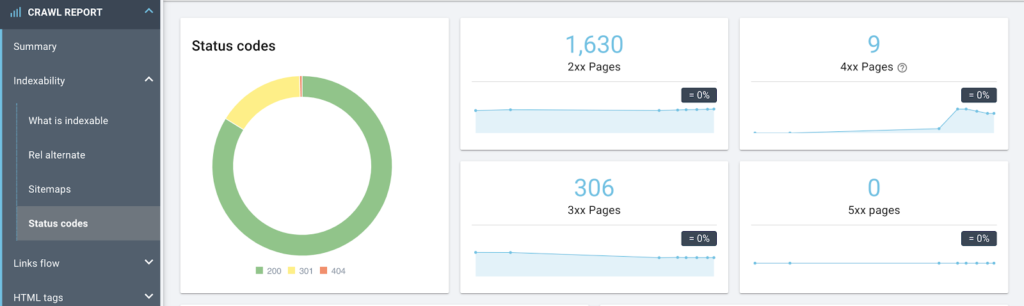
The following report allows you to prioritize your actions with a breakdown by status code and segments.
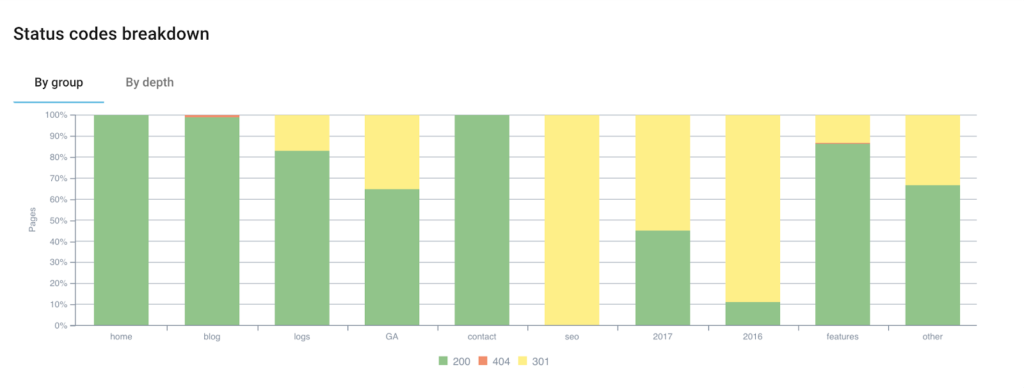
Click on the data you want to retrieve to export them in csv format.
To go further, you can also retrieve the status codes via your access logs.
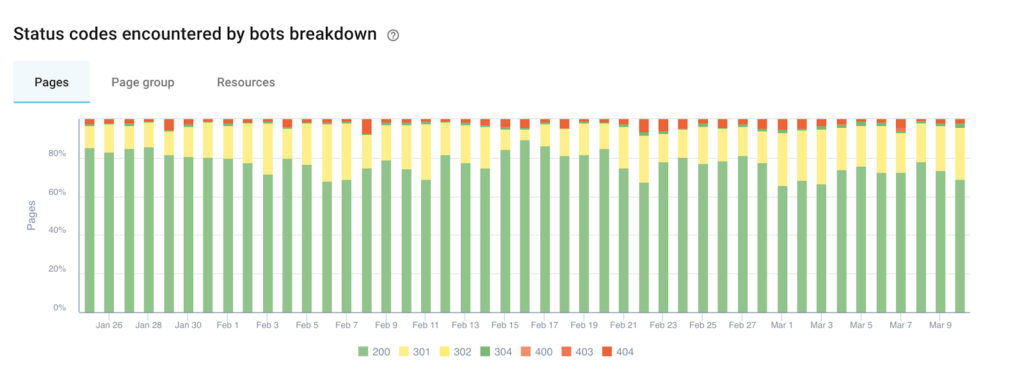
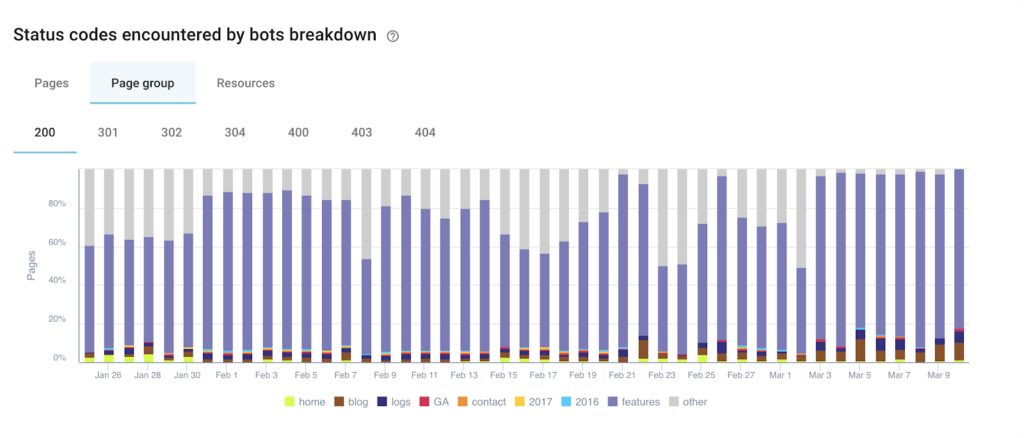
Go to the LOG MONITORING > Exploration sanity report to discover the breakdown of pages by HTTP status code encountered by google bots.
Correct the internal linking
To correct the internal linking, you need to find the links that point to pages that do not respond with an HTTP status code 200. You will need the originating pages, the anchors and the HTTP status code of the destination page.
Go to the data explorer, select the Links dataset and write the following query:
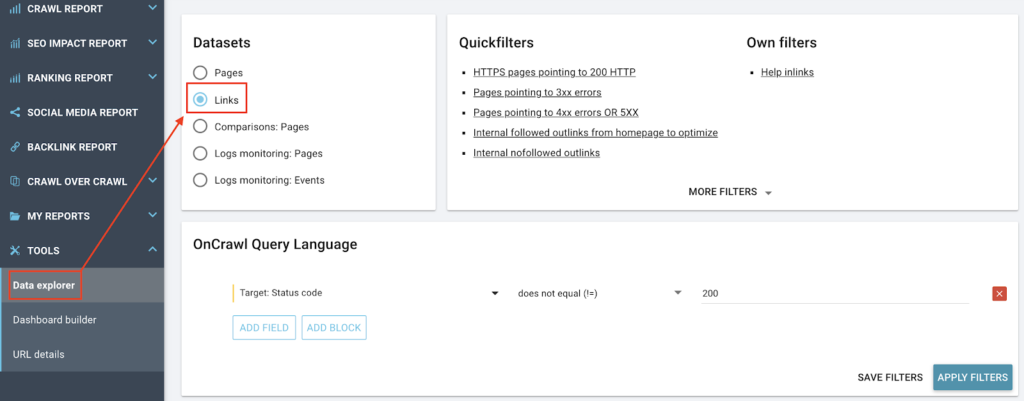
Now you just have to export to csv.
For 301’s, if you also want to know the redirection page, see the article on how to create a file listing all the links pointing to a 301 URL, the old URL and the new URL?