SEO practitioners sometimes encounter scenarios where their carefully planned optimization efforts backfired: pages mysteriously disappearing from search results, valuable crawl budget being wasted on non-essential content, or search engines choosing the wrong URL version to display.
These issues, in several cases, stem from misunderstanding how these three critical tools work. We’ll explore a structured approach to implementing these controls effectively.
The core of crawl control
First, let’s understand the unique roles of robots.txt, meta robots, and canonical tags. While these tools influence how search engines interact with your site, each tool serves a distinct purpose:
Robots.txt: A server-level file that blocks crawlers from accessing specific sections of your site. It prevents crawling but does not control indexation.
Robots Meta Tag: Page-level tags that manage indexing and crawling (noindex, follow /nofollow) behaviors. While effective, noindex still consumes crawl budget since the tag must be accessed to take effect.
Canonical Link Tag: Suggestions that consolidate duplicate or similar content to a preferred URL. Unlike directives, search engines may override canonical tags if other signals indicate a better option.

Where robots.txt fits in your strategy
The true strength of robots.txt lies in three key areas.
First, it excels at protecting sensitive sections of your website from being unnecessarily crawled but does not replace authentication/password for sensitive content. Admin panels and internal search results pages should typically be blocked from search engines to prevent them from appearing in search results. However, sensitive areas should be protected through authentication, as robots.txt does not prevent unauthorized access.
Second, for large-scale websites with millions of pages, robots.txt becomes crucial for crawl budget optimization. By strategically blocking low-value sections like user-generated content archives or outdated product variations, you can direct crawlers toward your most important pages.
An e-commerce site, for instance, might block crawler access to multi-dimensional filtering, sorting, and excessive pagination URLs, as these can generate a large number of low-value pages that don’t need to be indexed. While expired promotional pages or out-of-stock variations may also be removed from search results, their impact on crawl budget is usually much smaller in comparison.
Third, robots.txt can help conserve server resources by preventing crawlers from accessing non-essential files like dynamic URL parameters..
However, don’t block scripts and stylesheets – only block truly redundant ones, as blocking essential files can harm your site. Consider alternatives like lazy loading for managing style delivery.
Critical limitations to consider
Perhaps, the most misunderstood aspect of robots.txt is its relationship with indexing. A common misconception is that blocking a URL in robots.txt prevents it from appearing in search results.
The reality is more complex: while blocked pages can’t be crawled directly, they can still be indexed as URLs without content if Google discovers them through external links or sitemaps.
This limitation creates interesting scenarios where pages blocked by robots.txt appear in search results with limited information, often displaying only the URL and an autogenerated title. Potentially creating misleading or unhelpful search listings.
For true indexing control, meta robots tags provide more reliable solutions. Additionally, for a page to be indexed, it must first be crawlable.
Essential best practices
When implementing robots.txt, several critical practices ensure optimal performance:
- Never block CSS, JavaScript, or image files that are essential for rendering your pages. Modern search engines need access to these resources to understand your content’s context and layout properly. Blocking these assets hinders search engines from rendering and evaluating your pages effectively, harming search performance.
- Regularly test and maintain your robots.txt file, especially after site migrations or structural changes, to catch unintended blocking patterns. Keep it simple—avoid complex rules or wildcards that can lead to errors. Start with permissive settings and refine gradually, testing thoroughly to ensure critical content remains accessible.
- Maintain clear documentation for your robots.txt directives. This ensures continuity and prevents errors when team members or external partners update your site.
- Verify if user agents are being properly blocked by analyzing your server logs. These logs will show whether Googlebot and other crawlers are respecting your robots.txt directives and if any blocked paths are still being accessed.
- Research from the Web Almanac SEO report reveals that 14.1% of analyzed sites have a 404 error for their robots.txt file. This effectively removes any crawl control settings leaving search engines to crawl everything. While this might be intentional for some sites, for others, it could mean an oversight in managing crawler access. Regularly check server logs to verify search engines are requesting your robots.txt file and use Search Console to identify any crawling issues or errors.

When meta robots makes sense
Meta robots directives provide granular control in some cases. For instance, on an e-commerce platform, you might use noindex to prevent filtered product listing pages from appearing in search results.
While noindex, follow is sometimes suggested to allow link crawling, its effectiveness remains uncertain, as search engines may eventually stop crawling noindexed pages.
Similarly, nosnippet gives you control over how your content appears in search results, particularly useful for pages with sensitive or dynamic information.
Temporary content management becomes significantly more straightforward with meta robots. For seasonal campaigns or promotional pages, implementing noindex directives ensure these pages naturally drop from search results over time.
Alternatively, the unavailable_after tag can be used to specify an exact expiration date, though noindex is often the simpler approach.
This approach is particularly valuable for maintaining a clean search presence without accumulating outdated content in search indexes.
Avoiding critical implementation pitfalls
- Development-stage
noindextags sometimes slip into production, making vital pages invisible to search engines. Whilenoindexcan prevent indexing, it doesn’t block access—so for staging or development sites, password protection is the safest way to prevent unwanted crawling. Always verify directive configurations, especially during bulk updates. - Meta robots directives are ineffective on pages blocked by robots.txt, as crawlers can’t reach them to read the meta tags. Ensure crawl access for your indexing controls to work.
- Excessive
nofollowdirectives are uncommon but can disrupt internal link equity flow. Use them selectively and only where necessary.
Real-world application examples
E-commerce sales events
Build Black Friday pages with staged visibility: noindex/nofollow during development, full indexing at launch, then noindex/nofollow post-sale to remove the page from search results or use a 301 redirect to a relevant page to maintain link equity.
Subscription content
For subscription content, noarchive was once used to prevent paywall circumvention via cached pages.
However, since all major search engines have dropped support for cached pages, noarchive no longer serves this function. Instead, use Paywall structured data to help search engines recognize restricted content while maintaining visibility in search results.
Use max-snippet to control search preview length while maintaining visibility.
Development management
Keep noindex/nofollow on test environments to prevent competition with live pages, but verify these settings don’t migrate to production.
Navigation control
Use noindex on faceted navigation pages to eliminate duplicate URLs from appearing in search results. Some believe that noindex,follow allows search engines to continue discovering links on these pages, but this remains controversial.
In practice, search engines may eventually stop crawling noindexed pages altogether, so key internal pages should also be linked from fully indexed pages to ensure they remain accessible.

Simplifying duplicate content with canonical tags
While robots.txt and meta robots focus on controlling crawler behavior, canonical tags serve a different yet equally crucial purpose: helping search engines understand content relationships and identify preferred URL versions.
This distinction becomes particularly important when managing content that naturally exists in multiple locations or variations.
URL parameter control: Point canonicals to clean URLs when handling multiple parameter combinations (sorting, tracking codes) to prevent index bloat while maintaining functionality: example.com/products/laptop ← canonical target for all variants.
- Tracking Codes (e.g., UTM parameters, session IDs) → Always canonicalize to the clean version of the URL to prevent tracking-related duplicates.
example.com/products/laptop?utm_source=ads→ canonical toexample.com/products/laptop. - Duplicate Parameters in Different Orders → Standardize indexing by selecting a preferred version via canonical tags.
example.com/products/laptop?size=small&color=redcanonical toexample.com/products/laptop?color=red&size=small. - When URLs use the same parameters in different orders (e.g.,
size=small&color=redvs.color=red&size=small), search engines may treat them as separate pages. To prevent duplicate content issues, set a canonical tag on one version pointing to the preferred URL.
Product variations in e-commerce: E-commerce platforms particularly benefit from strategic canonical tag usage. Take a product available in multiple colors – each variation might generate a unique URL with identical core content. Without proper canonicalization, these pages compete for rankings, diluting your SEO efforts.
Alternate formats: Direct print-friendly versions and similar format variations to their primary pages through canonical tags to maintain clear search engine focus.
Point staging canonicals to the production domain: When staging environments are publicly accessible, staging pages may accidentally get indexed by search engines. While SEOs often use canonical tags pointing to the production site to prevent staging versions from outranking live content, the best approach is to block search engines from accessing staging environments altogether.
Using password protection or authentication ensures staging pages remain invisible to search engines, eliminating duplicate content risks at the root. If public access is required, a canonical tag can serve as a secondary precaution, but it should never be relied upon as the primary safeguard.

Critical implementation guidelines
Several key practices ensure canonical effectiveness:
- Always double-check that the canonical tag references the intended URL. A misplaced or incorrect tag can inadvertently shift authority to the wrong page.
- There has been debate about whether combining a canonical tag with
noindexcreates conflicting instructions for search engines. However, search engines can typically handle this without issues. In most cases,noindextakes precedence, meaning the page will be dropped from search results regardless of the canonical tag. If the goal is to prevent indexing,noindexalone is sufficient; if the goal is to consolidate signals, a canonical alone is the better choice. Combining them is generally unnecessary. - Canonical tags should always include the full, absolute URL (e.g., https://example.com/page) rather than a relative path. This ensures consistency and prevents misinterpretation by search engines.
- Pages should canonicalize to themselves unless they’re duplicates of another URL. This practice helps establish clarity and avoids confusion in search engines’ interpretation of your content.
Real-world examples
Retail websites with similar product pages
A shoe retailer has separate pages for different colors of the same shoe. Instead of allowing each URL to compete in search results, canonical tags point to the main product page. This consolidates link equity and ensures the primary page ranks higher.
Filtered category pages
On a fashion site, filters like “blue dresses” or “maxi dresses” generate unique URLs. Whether to canonicalize these filtered pages or keep them indexable depends on their strategic importance.
If “maxi dresses” is a valuable category that should rank in search, it should be a fully indexable page. If it’s just one of many filters with little standalone value, canonicalizing it to the broader category page helps prevent duplicate content issues.
The key is to intentionally decide which pages should be visible in search rather than letting them fall into a gray area.

Strategic indexing approaches for syndicated content
Google’s current guidance advises against using canonical tags as the primary method for managing syndicated content. While these tags were once the go-to solution, search engines increasingly override them based on other ranking signals, potentially leading to syndicated versions outranking original content—as seen when Yahoo! News articles supersede their original sources.
However, your approach to syndicated content indexation should be guided by your traffic sources and business objectives.
There can be strategic cases for allowing syndication partners with higher domain authority to index content, particularly when significant referral traffic is involved.
Implementation decisions should align with syndication agreements and consider factors like publication timing and the ratio of original to syndicated content on your site.
A systematic approach to crawling and indexing decisions
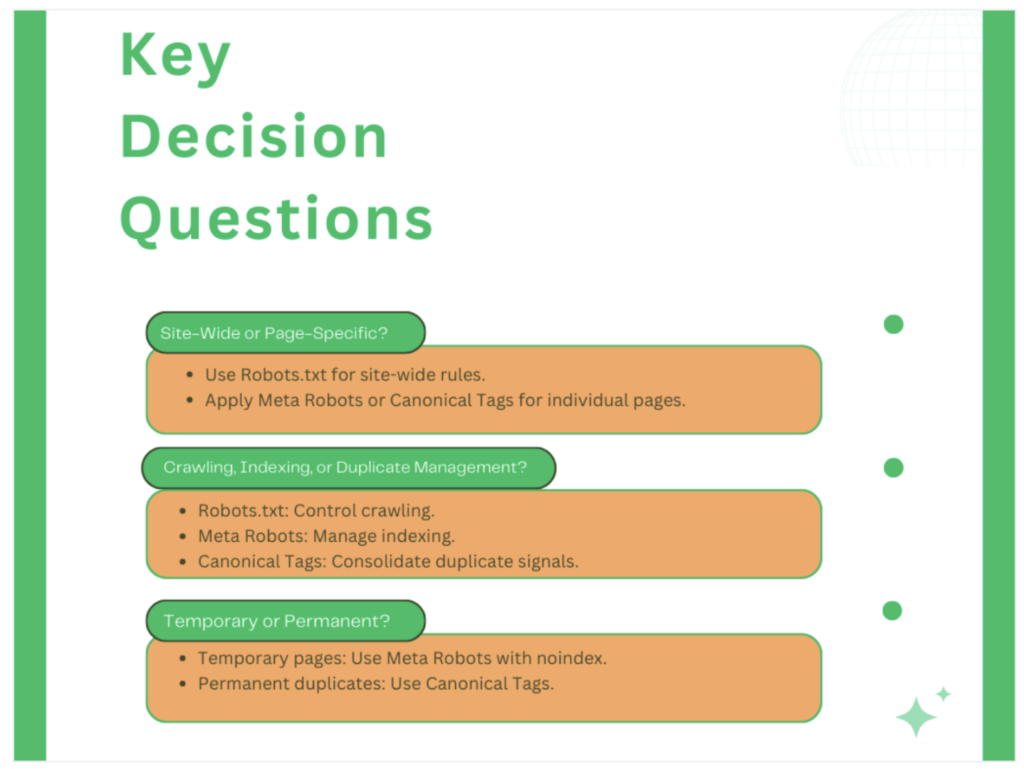
Making the right choice between robots.txt, meta robots, and canonical tags doesn’t have to be complex. By following a structured decision-making process, you can consistently implement the most effective solution for each scenario.
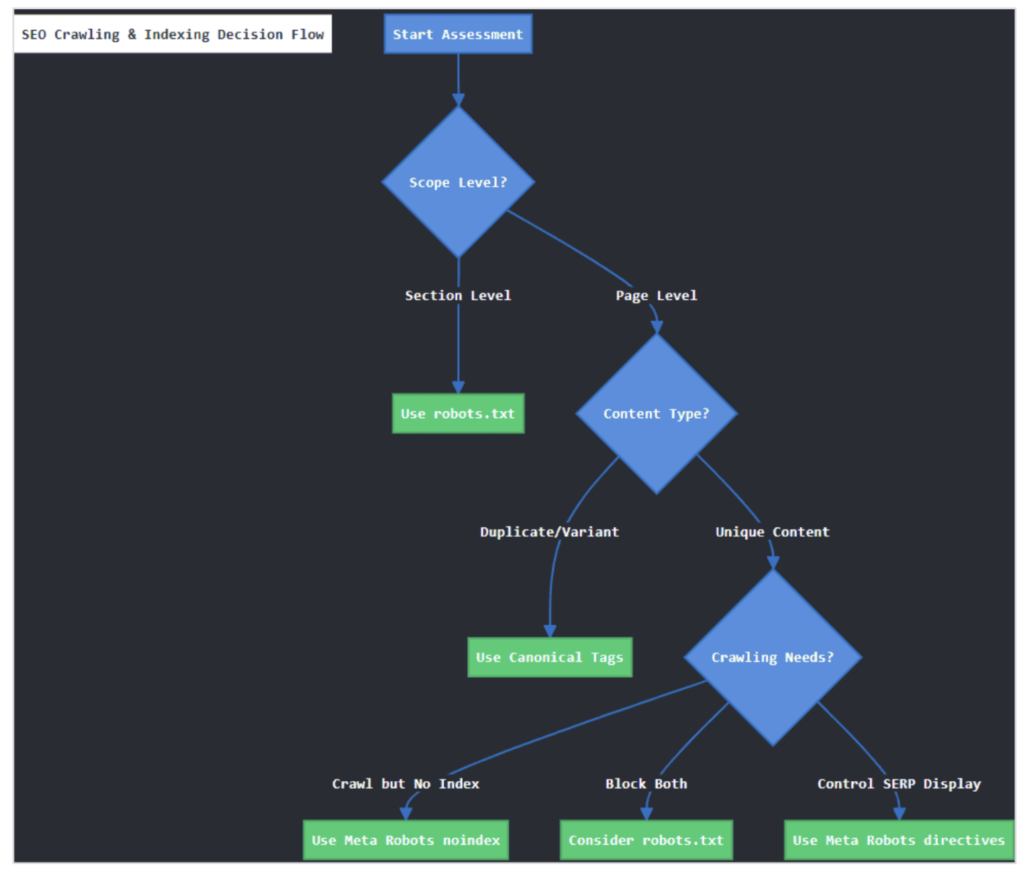
Step 1: Assess the scope
Before diving into specific implementations, determine whether you’re dealing with broad sections or individual pages. This initial assessment prevents overcomplicating solutions for straightforward problems.
For section-level control, robots.txt provides efficient management of entire directories. When blocking admin panels, development environments, or internal tools, a simple robots.txt directive can prevent unnecessary crawler access across hundreds or thousands of pages.
However, remember that this broad approach requires careful consideration – blocking /blog/2023/ might seem logical for outdated content, but it could inadvertently prevent crawling of valuable evergreen articles within that directory.
Step 2: Evaluate content uniqueness
For individual pages, content uniqueness becomes the key deciding factor. When dealing with product variations, filtered views, or content available through multiple URL patterns, canonical tags often provide the optimal solution.
They allow you to maintain all versions for users while consolidating ranking signals effectively.
Consider an e-commerce scenario:
- Original product page:
/products/blue-widget - With filters:
/products/blue-widget?size=large - With tracking:
/products/blue-widget?utm_source=email
Here, implementing canonical tags to /products/blue-widget preserves functionality while preventing duplicate content issues.
Step 3: Consider crawling needs
When managing unique content, the relationship between crawling and indexing becomes crucial. Meta robots directives offer precise control over both aspects.
For instance, seasonal landing pages might need temporary noindex directives while remaining crawlable to preserve internal link equity.
The crawling decision tree typically follows this pattern:
- Need a page crawled but not indexed? Use meta robots noindex.
- Want to prevent both crawling and indexing? Consider whether robots.txt might block important resources.
- Need to manage SERP appearance? Meta robots directives like
nosnippetprovide granular control.
Step 4: Combining tools effectively
Complex scenarios often require multiple tools working in concert. Understanding how these tools interact prevents conflicting implementations.
For paginated content series:
- Main listing page receives a self-referential canonical
- Google already treats paginated pages as part of the main sequence, so specifying
index,followisn’t necessary unless a site has a specific issue with pagination handling.
Similarly, for international sites:
- Hreflang tags indicate language relationships
- Canonical tags manage duplicate content across regions
Key implementation principles:
- Ensure robots.txt doesn’t block access to pages with important meta robots directives
- Maintain consistent internal linking patterns that support your chosen directives
For temporary implementations, set clear review dates and document your decisions. This prevents temporary solutions from becoming permanent problems and ensures regular validation of your technical SEO structure.

Take control of search behavior with confidence
While these tools might seem complex initially, proper implementation backed by regular testing and monitoring with specialized tools like Oncrawl can transform them from potential pitfalls into powerful allies.
Take time to audit your current implementations, test new configurations in staging environments, and monitor the impact of changes.
Remember that technical SEO isn’t about following rigid rules but about making informed decisions that align with your site’s goals and your users’ needs.
Your growing expertise with these fundamental tools will pay dividends in improved crawl efficiency, clearer indexing signals, and, ultimately, better search performance.